• Home
  • Games
    Action-adventure Simulation Business Role Playing Sports Competition Casual Intelligence Card Strategy Music Rhythm Text Puzzle Flying Shooting Love Development
  • Apps
    Business Office Newsletter Social Life Entertainment Online Shopping Practical Tools Travel Financial Management Educational Learning Information Reading Sports and Health
  • Articles

English 中文(简体) 中文(繁体) 한국어 日本語 Português Español Русский العربية Indonesia Deutsch Français ภาษาไทย
Home Apps Practical Tools TimeSticker
TimeSticker

TimeSticker

1
2
3
4
5
Download
  • Version 2.3
  • Category Practical Tools
  • Package Name net.dzyga.android.timesticker
  • Update Time April 1, 2026
  • Size 1.15MB
About this app

Write some short message on TimeSticker, set alarm and place it at home screen.

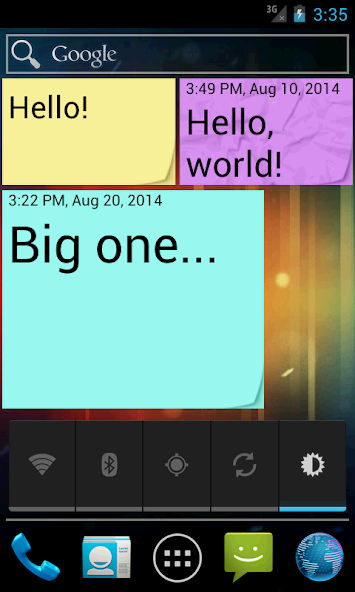
TimeSticker is a widget which provides you same functionality as simple yellow paper sticker. You can write some short message on it and place it at home screen. Font size changes automatically or manually. Number of stickers is limited only by the size of the screen. To edit sticker after creation just press on it. Also you can set a time and date reminder for each sticker.

LAUNCH: This application is a home screen widget. To run it in the Android 2.3 or lower press on an empty space of the desktop and hold until a menu appears. There select "Widgets" and in the list of widgets, find the TimeSticker.

To run in the Android 3.0 and above, click Applications and select the "Widgets", and then look for the TimeSticker and drag it to the main screen.

If you have not managed to find a TimeSticker, try some of the following:

1. Make sure that the application does not install on SD card

2. reinstall the application

3. reboot the phone (tablet)

4. If you download an application by a computer use an application Market, to install a TimeSticker

When you get widgets list, there would be able three TimeStickers with different sizes. Choose anyone you like. After that you'll not be able to change size, only delete and start again.

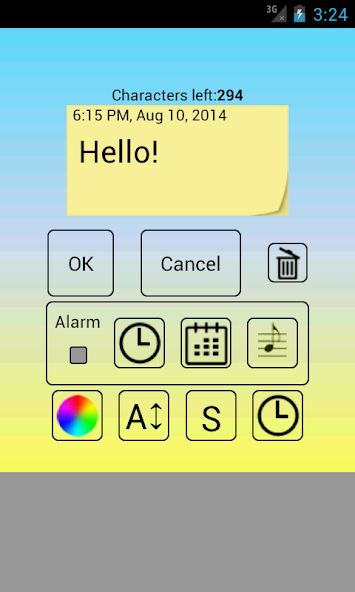
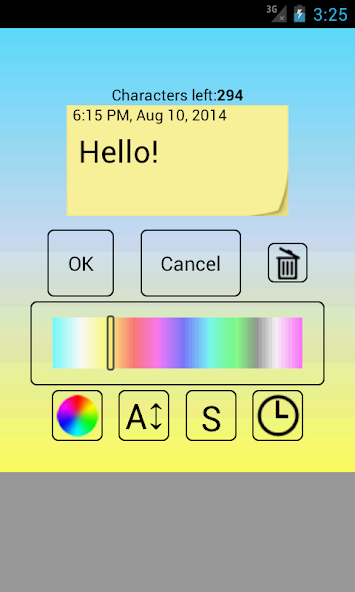
After you get widget configuration screen, you'll be able to set:

- an alarm time and date;

- sticker and alarm text;

- sticker text size;

- sticker background color;

- and alarm ringtone for all TimeStickers.

If you do not need to set an alarm for TimeSticker just uncheck alarm checkbox, and the TimeSticker will stay the same on your home screen.

If you set alarm and the time will came, TimeSticker will play ringtone, show message and set smashed paper as self background.
What's New in the Latest Version 2.3

Last updated on Mar 1, 2020 bug fixes
Download(1.15MB)
Users also viewed
  • Live Room Temperature Check

    Live Room Temperature Check

    0.0.1 April 17, 2026
  • Meteorologia

    Meteorologia

    207 April 17, 2026
  • Flying Hero Crime City Theft

    Flying Hero Crime City Theft

    1.0 April 17, 2026
  • Free WiFi Spot

    Free WiFi Spot

    0.9.6.6 beta April 17, 2026
  • FRB

    FRB

    1.0 April 17, 2026
  • IR Thermometer

    IR Thermometer

    1.1 April 17, 2026
  • Weather Switzerland XL PRO

    Weather Switzerland XL PRO

    1.5.6.2-ch April 16, 2026
  • Muzei - Behance Projects

    Muzei - Behance Projects

    2.1 April 16, 2026
  • V-SPEED Speed Test

    V-SPEED Speed Test

    4.3.2.0 April 16, 2026
  • My Doro Manager

    My Doro Manager

    MDM_1.18.2_272_PROD April 16, 2026
  • Mobile Phone Theft Tracker

    Mobile Phone Theft Tracker

    2.3 April 16, 2026
  • Wallpaper Search&Auto Changer

    Wallpaper Search&Auto Changer

    1.0.0 April 16, 2026
  • Wake Lock - CPU Awake

    Wake Lock - CPU Awake

    2.1 April 16, 2026
  • Snap Camera HDR - Trial

    Snap Camera HDR - Trial

    8.7.8 April 15, 2026
  • Romantic Love Camera HD

    Romantic Love Camera HD

    2.0 April 15, 2026
About Privacy Policy Terms of Service Cooking Policy

© Copyright 2017-2026 downzq.com