

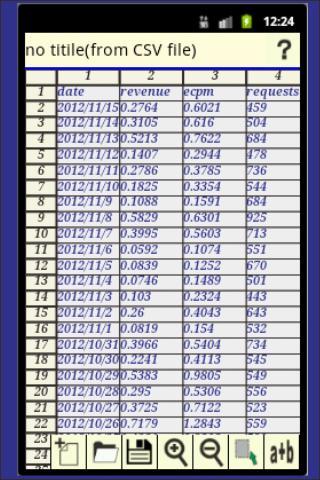
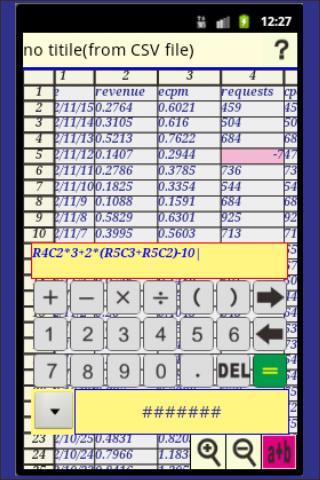
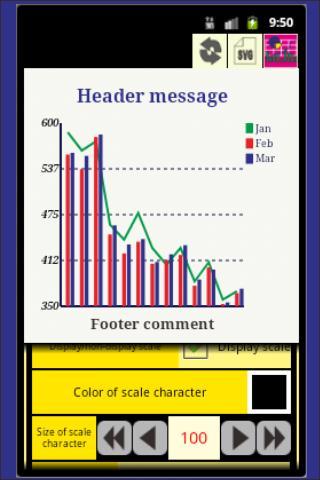
The spreadsheet, graphics, layout, and statistical analysis.
"Table-Graph Note" has the spreadsheet function, graphics function and a layout function.
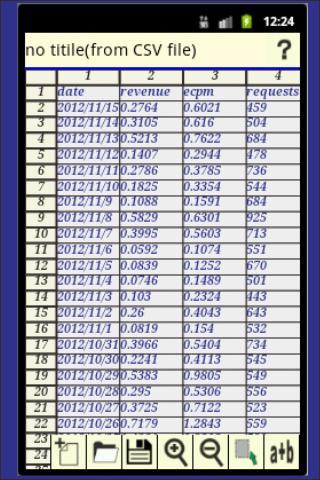
A numerical value, a date, and character data are treated in a spreadsheet. A formula can also be defined. A graphics function creates a legible graph for the specified range data of a spreadsheet in various forms, such as a bar graph and a line graph.
Furthermore, two or more graphs and photograph images can be well arranged along with a user's purpose using a layout function.
## Operation ##
The following procedure performs the input to a spreadsheet.
A touch of the cell on a spreadsheet will display an input dialog.
A character, a numerical value, or a date is chosen in this dialog, and a suitable value is inputted.
A display format can also be chosen about a numerical value and a date.
Reading of the CVS file created with the personal computer etc. is also possible.
If a CSV file is arranged to the directory (/mnt/sdcard/SkAndDev/SpreadSheet/CSV) subordinate on SD card, it comes to be able to perform selection and reading from a file list.
You carry out the tap of the cell and an input screen makes it display.
If the tap of the cell is carried out, it will be automatically added to expression.
## Limitations ##
[Row x Column] ... 400 x 20
The data in this restriction is read in CSV reading
[Data kind which can be drawn simultaneous] ... Up to three kinds.
Please refer to the following URL about operation.
https://googledrive.com/host/0B6kF91EAJC8gYmNmdjVXekdxN2c/index.html
--history--
□2013/03/24 Layout function strengthening
□2013/01/30 A mathematical function can be used for expression.
□2012/12/23 Addition of functions to the graph layout. They are image drawing, an input by hand writing, and a file operation function.
##2012/11/05 A pie chart is added.
##2012/12/10 Add function of graph layout
This "layout" arranges well each graph created by "Table-Graph Note" along with a user's purpose.
The graph which becomes a "layout" material is the file saved in the SVG format.
The SVG file created by our (SkAndDev) another applications (a "Plan Note", a "Schedule Note", etc.) can also be used as a material.














 Download