

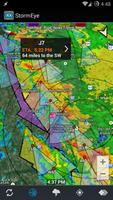
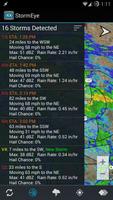
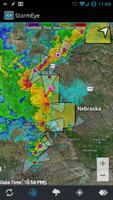
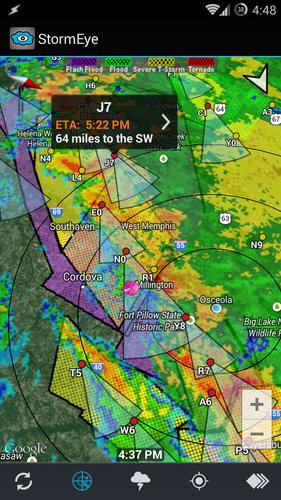
Detailed storm tracking information (including ETA) and weather radar.
StormEye provides detailed storm tracking information and weather radar images overlaid on Google Maps. For each storm, StormEye provides important information such as the storm's location relative to your location, where the storm is heading, estimated time of arrival (ETA), the storm's intensity, hail probabilities, and maximum hail size.
StormEye is free, without ads!
!!! StormEye is not being actively developed. I will keep StormEye functioning, but I currently have no plans to add new features. I'm satisfied with the current state of StormEye and I personally use it very often.
StormEye functions by downloading data from the National Weather Service for the selected WSR-88D weather radar. The radar closest to your current location is automatically chosen; however, you can quickly switch to any of the 156 NWS WSR-88D radars across the United States. The downloaded data is then used to construct a weather radar with markers and tracks for every detected storm.
StormEye Features:
• weather radar and storm tracks overlayed on Google Maps
• radar animation
• use gestures to zoom, pan, tilt, and rotate the map
• quickly switch to any of the 156 NWS WSR-88D radars across the U.S.
• tap a storm marker for details about a storm, including:
- estimated time of arrival (ETA)
- distance and direction from your location
- heading direction and speed
- max dBZ and rain rate
- probability of hail and several hail
- max hail size
• view a list of all of the storms at the selected radar
• average storm heading arrow in the top right corner
• your choice of Google Map type to display:
- Hybrid
- Satellite
- Terrain
- Map
• multiple weather radar types, including:
- Base Reflectivity
- Composite Reflectivity
- Base Velocity
- Storm Relative Velocity
- Storm Total Precipitation
• toggleable layers to choose what is displayed
• action bar for quick access to layers and options
• automatically finds your location using GPS or network
• manually enter your location with an address/zip code
• customize the color of the storm tracks
• customize the length of the storm tracks
• range rings around your location
• rotate the map using the compass sensor
• display warning polygons:
- Tornado Warning
- Severe Thunderstorm Warning
- Flash Flood Warning
• reflectivity strength (dBZ) legend
• warnings legend
• supports all 50 U.S. states, Puerto Rico, and Guam
To learn more, review StormEye's internal help guide, accessible via Help on the menu.
StormEye only supports the United States because the National Weather Service is the source of the weather radar and storm data.
Please consider emailing me ([email protected]) or contacting me on Twitter (@SmithCodyD) with your issue or question before giving StormEye a 1 star rating. A good portion of the time I will be able to help you!














 Download