

Enjoy millions of the latest Android apps, games, music, movies, TV, books, magazines & more. Anytime, anywhere, across your devices.
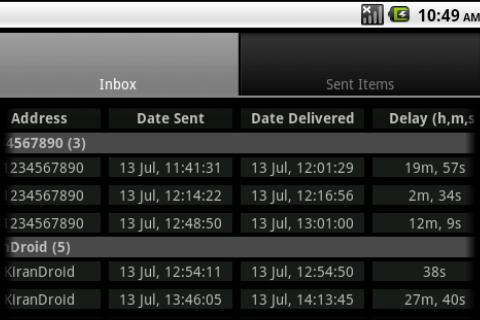
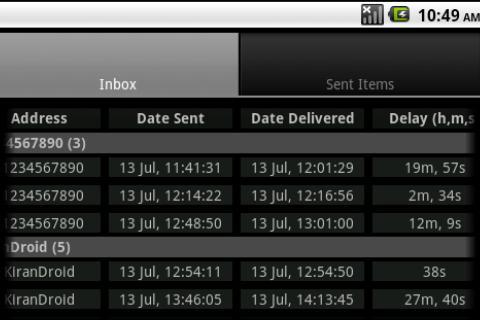
It's a well known fact that Android doesn't show the actual sent time of the messages that you receive in inbox as most of other phones do. This is a problem particularly for messages that are sent to you when your phone is switched off or out of network coverage area. It is not directly possible to know when such messages are actually sent as the phone only shows when they are actually received. SMS Delay Tracker extracts sent times from the message headers which are actually the sender's Service Center's time stamps and shows you how much they are delayed before reaching you.
Features -
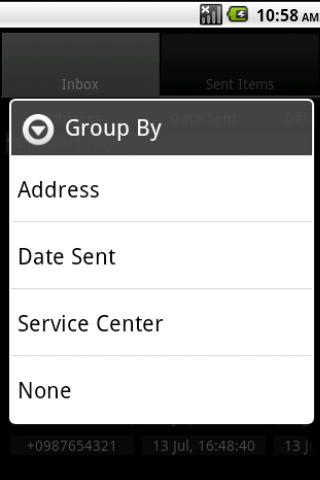
1. You can group messages by Contact Name, Date Sent, Service Center or just display them in the order you receive them. Grouping messages by Contact Name and Service Center helps you to know the relative delay of the messages (refer Limitation 1). By default messages are grouped by Contact Name.
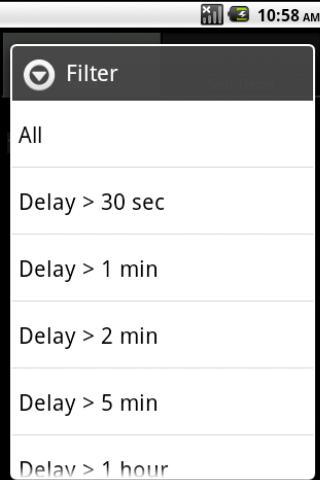
2. You can choose to see only messages that are delayed by more than 30 seconds, 1 minutes, 2 minutes, 5 minutes or 1 hour. By default, the app shows all the delays.
3. You can choose to see only messages for the past 3 Days, 7 Days, 30 Days or see all the messages. By default, the app shows past 7 days' messages.
4. The app remembers the above settings (Group By, Filter and Range) the next time you login to the app.
5. You can delete logs (time stamps, service center numbers) maintained for inbox messages (this does not delete messages from actual Inbox)
Disclaimer -
SMS Delay Tracker should be used as an indicator of delay than actually measuring it. Please refer the limitations below.
Limitations -
1. The delays shown are not absolute delays as there are time offsets between your mobile and the sender's Service Center (after correction of time zone differences). For, e.g, if the time difference between your mobile's clock and the sender's Service Center is 300 seconds, you will get delays greater than 300 seconds (negative, if your clock is slower than the service center) in which case you may need to subtract those 300 seconds to get the absolute delay. SMS Delay Tracker should be rather used as an indicator of delay than actually measuring it.
2. App does not show delays for already received messages. This is because the app doesn't read messages directly from inbox, rather it captures the time stamps when it is notified by Android for message arrivals.
3. Calculating delays for sent items entirely depends on delivery reports. You must enable delivery reports for SMS Delay Tracker to show delays on sent items. However, as of now, this feature is only available for Android versions (2.3 and above) that store the delivery date in internal SMS database (app displays an incompatible message for unsupported devices). The app will not be able to show delays for messages sent through third party apps.






 Download