• Home
  • Games
    Action-adventure Simulation Business Role Playing Sports Competition Casual Intelligence Card Strategy Music Rhythm Text Puzzle Flying Shooting Love Development
  • Apps
    Business Office Newsletter Social Life Entertainment Online Shopping Practical Tools Travel Financial Management Educational Learning Information Reading Sports and Health
  • Articles

English 中文(简体) 中文(繁体) 한국어 日本語 Português Español Русский العربية Indonesia Deutsch Français ภาษาไทย
Home Apps Business Office Smart OnOff
Smart OnOff

Smart OnOff

1
2
3
4
5
Download
  • Version 1.7
  • Category Business Office
  • Package Name com.blogspot.imapp.imsmartstay
  • Update Time November 27, 2025
  • Size 1.65MB
About this app

Smart stay not only Samsung phone

Operation like Samsung's SmartStay is possible with this app.

You can make phone not going to sleep when you hold it up but go sleep lay it down.

It does not use camera to decide it's status but use g-sensor so consumes less battery and can support phones which do not have SmartStay capability as many phones do.

When you reading or in daily life this could be very convenient because you don't even need to look for power button every time to turn it off.

Just flip it!

By default, it was set to be off on Face Up, if you put down phone on the desk, show notification icon for wait period of 2 seconds, then screen will be off.

Notification icon will be removed as soon as the phone is out of level position such as if you hold it up, so it should stay still for designated seconds to be turned off.

The waiting period is adjustable even to None which will turn it off as fast as possible.

If Face Detect option is on, face will be detected just before going to sleep and prevent it when detected. Front-facing camera is required.

Opinions are always welcome.

* To uninstall this app, first uncheck device administrator settings. You can find it in settings->Location&Security->Select device administrators.

* On Android IceCream Sandwitch phone (v4.x), OS has bug which will make screen on immediately after going to sleep.

- Features

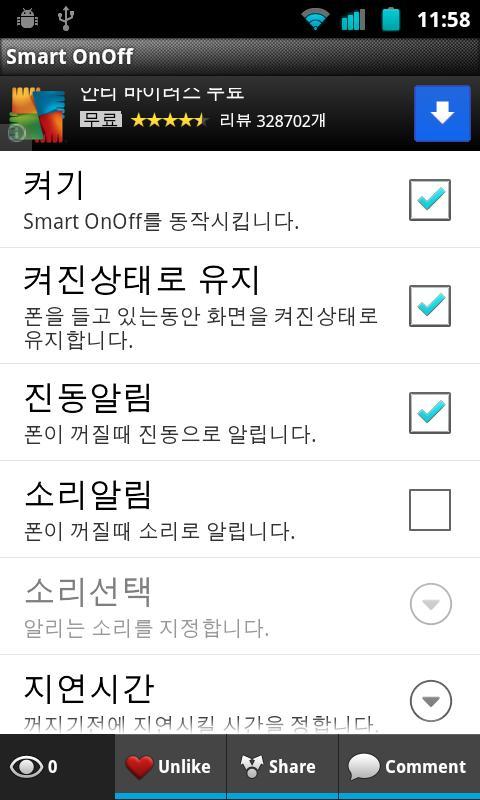
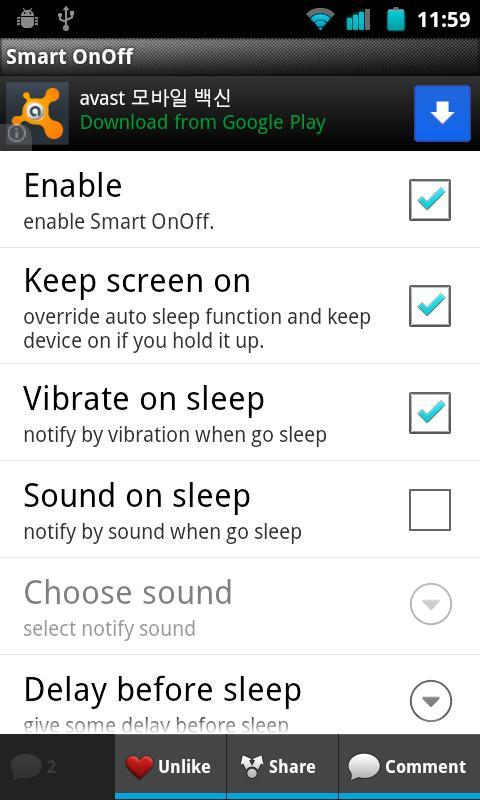
Enable/Disable

Keep awake while holding up or not

Vibrate/Sound sleep notify

Delay time : set delay before go to sleep

Sleep position selection : Face up, Face Down, Both

Face detection before going to sleep

- Permissions

All permissions are used only for showing Ad and lock device.

** Update history

Sensor changed to cover more devices

Face detection before going to sleep

What's New in the Latest Version 1.7

Last updated on Sep 3, 2015 Desktop Ad icon removed
Download(1.65MB)
Users also viewed
  • The AddressBook to communicate

    The AddressBook to communicate

    1.2.3 March 3, 2026
  • Asistente Agenda

    Asistente Agenda

    3.7 March 2, 2026
  • PlanPlus Online Shortcut

    PlanPlus Online Shortcut

    1.0 March 2, 2026
  • All Document Reader

    All Document Reader

    2.0.21 March 2, 2026
  • Quilicura Inteligente

    Quilicura Inteligente

    1.0.0.6 March 2, 2026
  • Leopard

    Leopard

    2.1 March 2, 2026
  • Mr.Box2 -Magic Finger Plugin

    Mr.Box2 -Magic Finger Plugin

    1.0.0 March 2, 2026
  • Alarm every 15 minutes

    Alarm every 15 minutes

    0.1.3 March 1, 2026
  • Kurdistan Flag for Kurdish

    Kurdistan Flag for Kurdish

    1.1 March 1, 2026
  • Stock Market Guide

    Stock Market Guide

    1.0 March 1, 2026
  • Mexico Calendario 2025

    Mexico Calendario 2025

    2.1.0 March 1, 2026
  • VT-Live

    VT-Live

    2.6 February 27, 2026
  • Cockpit ITSM

    Cockpit ITSM

    6.0.1 February 27, 2026
  • Scribble Mail

    Scribble Mail

    1.3.2 February 26, 2026
  • Darwin Wallet

    Darwin Wallet

    2.3 February 26, 2026
About Privacy Policy Terms of Service Cooking Policy

© Copyright 2017-2026 downzq.com