

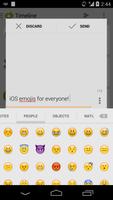


Quick and easy access to all your favorite emojis!
This is a trial app!
PLEASE READ:
Features:
- 850+ iOS 7 emojis to use in any app you want!
- Light, dark and black keyboard backgrounds
- A smooth sliding interface to quickly get you to the right emoji you want
- A favorites section to let you get to your most used emojis quickly
--- If you don't read it, it will be very obvious to us and we WILL NOT be willing to help you. You have been warned. ---
This is a standalone keyboard that we have created with our app Sliding Messaging Pro. It is baked into that app, so there is no need to download here if you are only using it for that app, but we wanted to add it for anyone to use, even if you don't support us through that app.
This keyboard only Apple's iOS emojis.
NOTE: This app will NOT actually show the emojis in the text box or on the device unless your system supports them! Please understand this! We have no way to add support for that from this app. If you would like to get that working, you will have to have a rooted phone and change the system font to one that supports Google's emojis.
Even though it doesn't show them correctly in the text boxes, when you send the message/tweet/email or whatever you are using it for, they will show up correctly, again as long as the app supports Google's new emojis. The recipient will receive them fine as well, as long as their phone has emoji support. They will be received fine on any iOS devices and any messaging app for Android that supports them. Almost all do by now.
To actually see the emojis in the app, you will have to install an app that supports them. Examples of this would be: Sliding Messaging Pro, WhatsApp, Hangouts, and many more, you will have to find out yourself if the app you want to use our keyboard with supports them.
--- How to Enable/Use ---
To enable the "Sliding Emoji Keyboard - iOS", go to Setting -> Language & Keyboard, then check the "Sliding Emoji Keyboard - iOS" to enable it.
To use "Sliding Emoji Keyboard - iOS", you need to change the input method:
- In Android 2.3 and below, select "Sliding Emoji Keyboard" from the dialog that comes up after long pressing on any text box.
- In Android 4.0 and above, drag down the notification try when a text box is selected, then select "Sliding Emoji Keyboard - iOS" after switching the input method.
--- REMEMBER ---
As I said above, you won't be able to see all the emojis on the device! Sometimes they will show up as a blank space and usually they will show up as aiona black and white image of the selected emoji. THIS IS FINE. THEY WILL SEND CORRECTLY to all your friends that have support for them (again, iOS users and any Android messaging apps that have the emojis in them).
Please don't just rate it one star because you can't see the images. I have explained it to you, so there are really no excuses for this.
Thank you for reading, and if you didn't, remember that we will not be very willing to help or support you.
Version 1.00:
- Initial release!









 Download