• Home
  • Games
    Action-adventure Simulation Business Role Playing Sports Competition Casual Intelligence Card Strategy Music Rhythm Text Puzzle Flying Shooting Love Development
  • Apps
    Business Office Newsletter Social Life Entertainment Online Shopping Practical Tools Travel Financial Management Educational Learning Information Reading Sports and Health
  • Articles

English 中文(简体) 中文(繁体) 한국어 日本語 Português Español Русский العربية Indonesia Deutsch Français ภาษาไทย
Home Apps Practical Tools Slick Watchface
Slick Watchface

Slick Watchface

1
2
3
4
5
Download
  • Version 0.9.0.0
  • Category Practical Tools
  • Package Name com.suncod.slickwatchface
  • Update Time May 26, 2026
  • Size 6.07MB
About this app

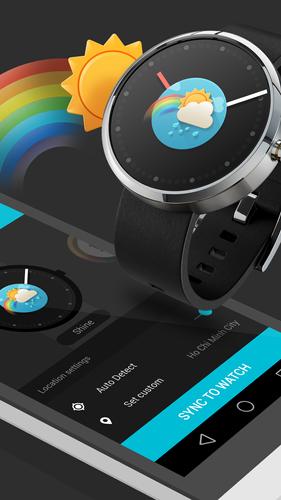
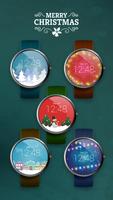
The slickest Android Wear Watch Faces with unique designs and weather support.

Most themes are FREE, get them quick!

► RICH FEATURES

• Weather condition watch faces.

• Custom location.

• Weather refresh interval.

• 24-hour digital clock support

• Screen awake time setting (developing)

• Build-in launcher (developing)

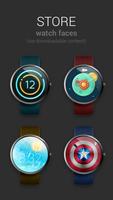
► THEME STORE

• Download free and premium watch faces.

HOW TO USE:

1. Pair your android wear watch with your android phone via Bluetooth.

2. Install Slick Watchface app from Google Play Store.

3. Open Slick Watchface app on phone.

4. Select or download the available themes by swiping left and right.

5. Change your location (Optional)

6. Tap SYNC TO WATCH to push the watch face to your android wear watch.

Note: you must select Slick Watchface icon by long-press the main screen of your android wear watch or select it from Android Wear app in order to make the Watch faces display on your screen.

----------------------------------------------

Supported devices:

- Samsung Gear Live

- LG G Watch

- Moto 360

- Zen Watch (untested)

(Basically any round and square Android Wear watches)

- Android Phone running Android OS 4.3 and newer

----------------------------------------------

FAQ

1. The Slick Watchface app keeps showing "Device Disconnected"

Please make sure you have turned on Bluetooth connection and pair your Android phone with your Android Wear watch by using Android Wear app on the Google Play Store.

2. I can't download the themes

Slick Watchface themes are stored on our server, therefore you need an Internet connection to be able to download them, we suggest you to use good connection like Wi-Fi.

3. Synchronization takes too long

Please keep your Android phone and your Android wear watch close enough (within 1 meter). Some of our themes contain many images (Window theme), therefore it will take about less than a minute to finish the synchronization.

4. How can I get more themes?

We update new theme frequently to the Watch face Store, you can download free for pay for premium watch faces. The Store button is located at the top-right corner of the app.

----------------------------------------------

Please send your feedback to our support email at: [email protected] before giving bad rating on Google Play Store, we will try to solve your problems as soon as possible. Thank you! ☺
What's New in the Latest Version 0.9.0.0

Last updated on Aug 6, 2015 - New premium theme with weather.
- New Lunar new year theme.
- New Redeem feature for paid themes, post/share Slick Watchface app on your Facebook or Twitter to get a free Redeem Code. Take a screenshot of your post and email to us at: [email protected]
- Many bug fixes and improvements.
Download(6.07MB)
Users also viewed
  • Personal Weather Forecast App

    Personal Weather Forecast App

    15.1.0.46261 October 18, 2026
  • Top News GO Locker Theme

    Top News GO Locker Theme

    1.0 October 18, 2026
  • Times Tables

    Times Tables

    3.0.2 October 18, 2026
  • RETRO JORDANS Live Wallpaper

    RETRO JORDANS Live Wallpaper

    444 October 18, 2026
  • Wear OS Toolset Complications

    Wear OS Toolset Complications

    4.1.3 October 18, 2026
  • Weather Models Europe

    Weather Models Europe

    0.5.4 beta October 17, 2026
  • Lightning Camera

    Lightning Camera

    3.1 October 17, 2026
  • Wild Leopard Lite

    Wild Leopard Lite

    1.6 October 17, 2026
  • Kids Carnival Photo Montage

    Kids Carnival Photo Montage

    1.2.4 October 17, 2026
  • home window design 2018

    home window design 2018

    1.0 October 17, 2026
  • New Photo Editor 2016

    New Photo Editor 2016

    1.1 October 16, 2026
  • Appools

    Appools

    1.1.0 October 16, 2026
  • Pomodoro Cards

    Pomodoro Cards

    2.0 October 16, 2026
  • Add text

    Add text

    8.2.4 October 16, 2026
  • Photo Editor Collage Maker

    Photo Editor Collage Maker

    1.43 October 16, 2026
About Privacy Policy Terms of Service Cooking Policy

© Copyright 2017-2026 downzq.com