

When all you care to know about the weather is if it's about to kill you or not.
Don't be surprised by the weather again!
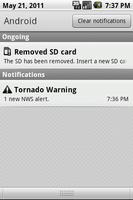
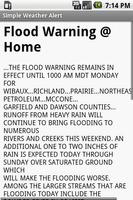
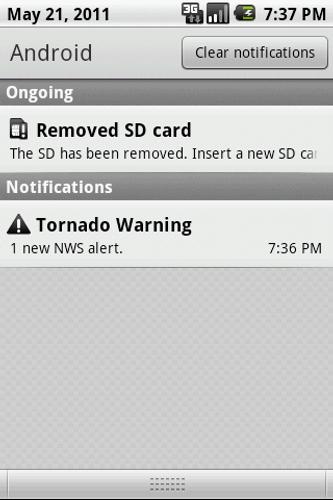
This app runs in the background and monitors the official National Weather Service (NWS) alerts for your area. New alerts will appear on the status bar, and by selecting it, you can read the details.
You can also choose how urgent of a notification to get, based on the NWS Severity. An Extreme alert coming through? Then you'd probably like vibrate, lights AND bell for that! But a simple Wind Warning? Probably not as much. You can choose the level of response in the preferences.
Simple Weather Alert allows you to monitor one location for NWS alerts. If you want to monitor more locations (including locations that move with you), then consider purchasing Pro Weather Alert.
Simple Weather Alert Features:
+ Monitor NWS weather alerts for your area
+ Choose how to be notified (lights, bell, vibrate)
+ Modify notification based on NWS severity (go crazy for extreme alerts, such as Tornado Warning)
+ Alerts keep updated automatically as long as you have connectivity
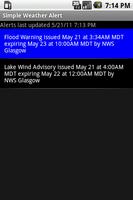
+ Browse the alert list when there are multiple alerts, and read the details and instructions for the 2 MOST SEVERE alerts, as well as any EXTREME alerts.
+ An app widget added to your home screen allows for easy on/off toggling of lights, vibrate and sound settings. The alerts will still be checked and put on your status bar though, so you can keep an eye on it during class or church, without it causing distraction.
+ Key words and phrases list. Create a list of words or phrases, and when an alert is received that contains those words or phrases, it will be marked in the alerts list with an icon, and the phrases will be highlighted when you read the alert details.
+ Email an alert to friends or send via text message (requires Contacts List permission), so they can be warned as well.
+ Post an alert on Facebook or your Twitter feed, to get the word out fast.
+ Input your location by city, county, zip code, or let the app find your phone location by GPS or network location providers.
You can view the app manual here:
http://android.globalcanofworms.com/guides/swa_pwa/Simple_Pro_Weather_Alert_Manual.html
An explanation of permissions: The SMS and Contacts List permission are required so you can send an alert to someone via text message. The contacts list permission allows for easier selecting of the number.
IMPORTANT: While we take all possible precautions to make sure this app will get you critical alerts on time, the unforseen can still occur, as well as simple cell/network outages. Thus, we do not recommend that you ever rely on this app ALONE for tornado warnings. Please use this app along with other methods to ensure you are alerted in time.
NOTE: If you are certain the app is not sending you the alerts it should, please use Menu:Troubleshooting to send us debug info about it so we can work to resolve it quickly.
If you run into any other issues with this app or have questions, send us a note in the Menu:Troubleshooting screen. Also, visit the developers blog on our website for a list of current issues we are addressing.
Thank you!
Fixed an error preventing NWS access.













 Download