• Home
  • Games
    Action-adventure Simulation Business Role Playing Sports Competition Casual Intelligence Card Strategy Music Rhythm Text Puzzle Flying Shooting Love Development
  • Apps
    Business Office Newsletter Social Life Entertainment Online Shopping Practical Tools Travel Financial Management Educational Learning Information Reading Sports and Health
  • Articles

English 中文(简体) 中文(繁体) 한국어 日本語 Português Español Русский العربية Indonesia Deutsch Français ภาษาไทย
Home Apps Practical Tools QR Code Reader
QR Code Reader

QR Code Reader

1
2
3
4
5
Download
  • Version 2.3
  • Category Practical Tools
  • Package Name me.scan.android.client
  • Update Time October 15, 2025
  • Size 50MB
About this app

Easily scan QR codes and barcodes.

HOW THE APP WORKS

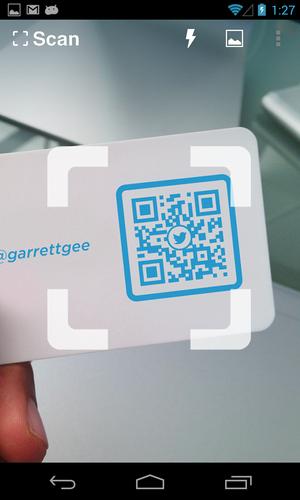
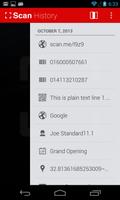
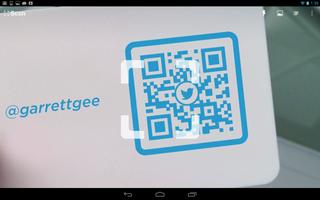
To scan a QR code or barcode simply open the app, point the camera at the code, and you’re done! There is no need to take a photo or press a button. The app will automatically recognize any code your camera is pointing at.

When scanning a QR code, if the code contains a website URL, you will automatically be taken to the site. If the code just contains text, you'll immediately see it. For other formats such as phone numbers, email addresses, or contact info, you will be prompted to take the appropriate action.

PRODUCT BARCODES

QR Code Reader recognizes all of the popular barcode types (UPC, EAN, and ISBN) and shows you pricing, reviews, and more about any products you scan. Barcode scanning requires a newer device in order to work reliably. Cameras on older devices do not provide the resolution or focus required for barcode scanning.

ADDITIONAL FEATURES

• Toggle your front or rear camera for scanning

• A switch to turn on your device’s light (if it has one) for scanning in low-light circumstances

DEDICATED TO PERFECTION

Our goal is to make our app the best scanning app in the store. We can’t do this without you. We are dedicated to your satisfaction and need to hear feedback from you. If you have an issue with the app, please do not write a review of the app saying "it didn't work." This does not help us make things better for you. Instead, please contact us at [email protected] and we'll do our best to help.

REQUIREMENTS

In order to use the app, your device must have a built-in camera. When scanning codes that redirect to online content, such as websites, you will need Internet connectivity.

What's New in the Latest Version 2.3

Last updated on Mar 16, 2016 What’s new in version 2.2.3
- Enhancements to the in app browser
- Bug fixes

What’s new in version 2.2.3
- Bug fixes

What’s new in version 2.2.2
- Bug fixes

What’s new in version 2.2.1
- Enhancements to the in-app browser

What’s new in version 2.2
- Fixes to minor issues and enhancements

- Create and scan your own QR codes on our site at http://scan.me

Download(50MB)
Users also viewed
  • Laredo, TX - weather and more

    Laredo, TX - weather and more

    1.0 December 1, 2025
  • Air4ASEAN

    Air4ASEAN

    1.0.7 December 1, 2025
  • RunCam HD App

    RunCam HD App

    1.1 December 1, 2025
  • Root Verifier

    Root Verifier

    2.0 December 1, 2025
  • Mountain Weather

    Mountain Weather

    1.8.2 December 1, 2025
  • Pest Detection

    Pest Detection

    4.0 December 1, 2025
  • ADWTheme Symbian

    ADWTheme Symbian

    1.0.5 November 30, 2025
  • Third Party Inspections

    Third Party Inspections

    1.6 November 30, 2025
  • Key Chain

    Key Chain

    1.7 November 30, 2025
  • dodol Phone (data)

    dodol Phone (data)

    3.1.33 November 30, 2025
  • Fast Translator

    Fast Translator

    1.0 November 30, 2025
  • Kawaii Pic

    Kawaii Pic

    1.085 November 30, 2025
  • South African ID

    South African ID

    7.4.0 November 30, 2025
  • Puppies Live Wallpaper

    Puppies Live Wallpaper

    2.12 November 29, 2025
  • UltraShield

    UltraShield

    1.9 November 29, 2025
About Privacy Policy Terms of Service Cooking Policy

© Copyright 2017-2025 downzq.com