

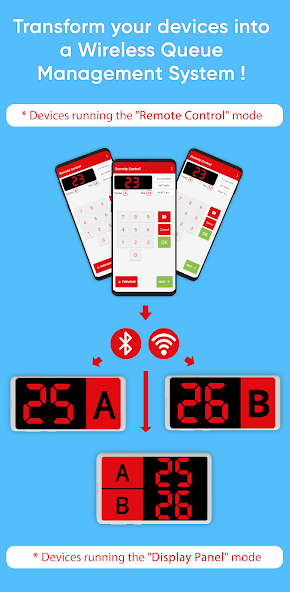
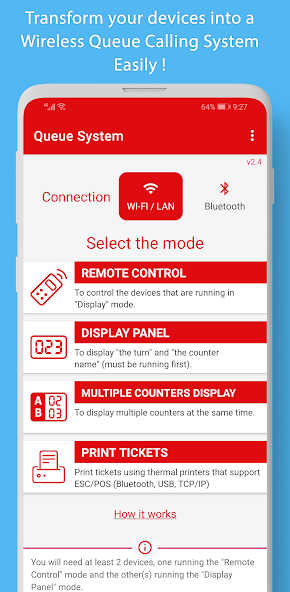
Transform your devices into a Wireless Queue Management System easily !
Este aplicativo permite que você converta facilmente seus dispositivos Android em um sistema de gerenciamento de filas sem fio, usando Bluetooth ou Wi-Fi e Ethernet (rede local da área).
Características:
• Control multiple displays at the same time with one device.
• Possibilidade de ter várias exibições e vários dispositivos que controlam esses monitores, como por exemplo, o sistema bancário, onde existem vários contadores e cada funcionário controla o número exibido (o próximo turno) vinculado ao seu contador.
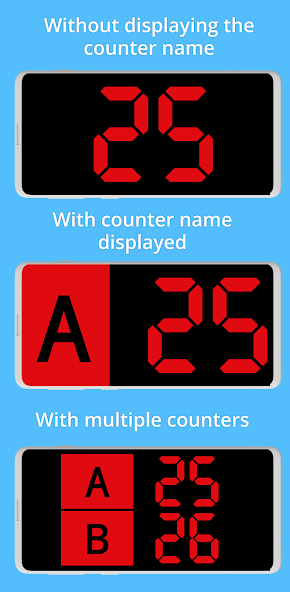
• Possibility to have multiple counters in a single display device.
• Possibility to display the counter (A, B, C...) in the display or hiding it.
• Multiple display customization options (Colors, Fonts, Sounds, Voice, Languages, Effect, etc.)
• Sound alert to notify people in the queue that the turn has changed (note: make sure the volume is not muted in the device)
• Possibilidade de anunciar o número atual com "voz" usando a síntese de voz do dispositivo (verifique se o idioma está instalado nos dois dispositivos).
• Print tickets using thermal printers that support ESC/POS (Bluetooth, USB, TCP/IP).
• Easy control of the displayed numbers.
• AndroidTV/GoogleTV support
Como funciona:
First, you need to install the app on all the devices you want to use. You will need at least two Android devices, one running "Remote" mode and the other or more running "Display Panel" mode. Então:
1. Choose the type of connection that will be used: "Bluetooth" or "Wi-FI/LAN", the chosen type must be used on all other devices as well.
2. No primeiro dispositivo (por exemplo, um tablet) inicia o aplicativo no modo "Painel de exibição", que permitirá que ele aguarde conexões de outros dispositivos executando o modo "controle remoto".
3. No segundo dispositivo, inicie o modo “controle remoto” (para o Bluetooth, você verá a lista de dispositivos já emparelhados) e poderá pressionar o botão “Pesquisa” para encontrar novos dispositivos.
4. Choose the first device you want to use and press "Next". If this is the first time, Bluetooth/Wi-FI pairing will take place. After that press “Next”.
Nota no Bluetooth: se você não vê os dispositivos que deseja usar ou a digitalização não está funcionando, emparelhe os dispositivos manualmente das configurações Bluetooth do sistema.
5. If you have chosen a single device a window will open directly to control this device. Se você escolheu vários, uma janela será aberta perguntando qual dispositivo você deseja controlar (pois é possível ter vários dispositivos controlando e vários outros exibindo os números, e cada pessoa poderá controlar seu próprio "painel de exibição"). ").
6. You can also modify the name of the counter, and choose to display it or not.



 Download