• Home
  • Games
    Action-adventure Simulation Business Role Playing Sports Competition Casual Intelligence Card Strategy Music Rhythm Text Puzzle Flying Shooting Love Development
  • Apps
    Business Office Newsletter Social Life Entertainment Online Shopping Practical Tools Travel Financial Management Educational Learning Information Reading Sports and Health
  • Articles

English 中文(简体) 中文(繁体) 한국어 日本語 Português Español Русский العربية Indonesia Deutsch Français ภาษาไทย
Home Apps Life Entertainment Prayer times, Qiblah, Adzan
Prayer times, Qiblah, Adzan

Prayer times, Qiblah, Adzan

1
2
3
4
5
Download
  • Version 1.7.6
  • Category Life Entertainment
  • Package Name com.brixzen.jadwalsholat
  • Update Time February 7, 2026
  • Size 8.82MB
About this app

prayer schedule (automatic adzan) for moslem with qiblah locator

WARNING : Don't kill this app from your task manager or you can lock your app to prevert task manager kill list, if you not do that the alarm will not work.

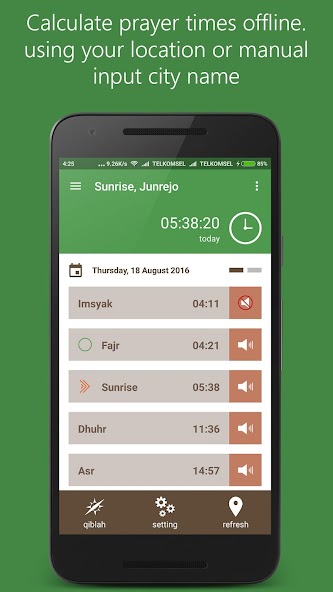
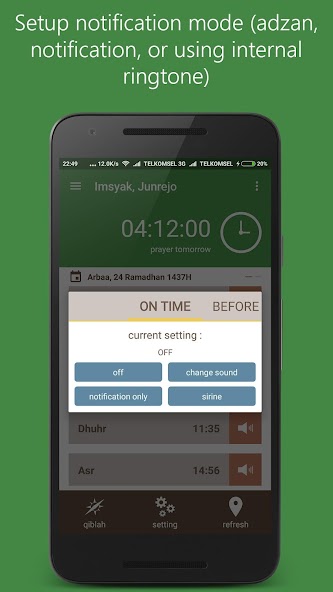
'Prayer Times' is a prayer schedule apps (incl. Time of shalah, any prayer schedule in islam, etc). With this apps we can get any newest update time information of shalah, imshak time, or iftar time (break-fasting) day by day. This apps also included with reminder/alarm (with adzan sound) that will activated when the time of shalah is come. You can also change the sound of reminder by selecting your favorite tunes.

There is no need to use your data. You can use it offline later. This apps will updating your newest schedule based on your location ( you can set your location automatically, or manually by inputing your place coordinates). This apps also giving a direction to kabah (makkah) by using calculation of android digital compass.

NOTES :

For MI smartphone user with MIUI OS. We advise you to activating auto start feature.

You can go to Menu -> Security -> Permissions -> Start Automatically, give a check to "Prayer Times" apps to avoiding sounds of adzan not working when you restarting your smartphone.

For OPPO smartphone user. Goto Oppo Security Center app->Permissions Management->Auto-run management->Prayer times->turn on. Adzan in "Prayer Times" app will work.

For Asus zenfone. Select Auto-start manager-Prayer times-Allow. And reminder will work correctly.

features:

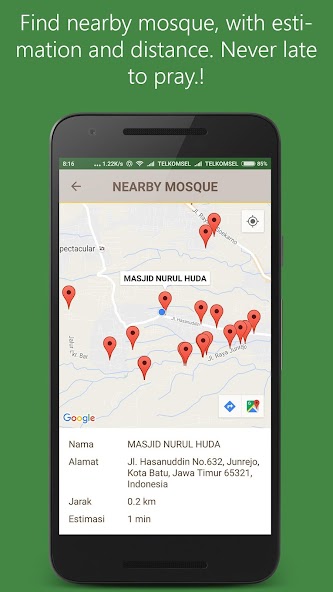
* Nearby mosque (with distance and estimation)

* Alarm adzan

* Tasbeeh counter

* Muslim holiday reminder

* Turn the alarm tone prayer schedule

* Offline schedule

* Qiblah direction

* Vibrate in silent mode

* Compass correction

* Prayer schedule correction

* Show current hijri calendar

* Calculate prayer in specific date

* City input manual and auto (GPS)

* Alarm before the prayer schedule

* Know the schedule of tomorrow

What's New in the Latest Version 1.7.6

Last updated on Oct 20, 2024 Alarm stability update
More fast and light
Fix location GPS
Download(8.82MB)
Users also viewed
  • Stick Nodes

    Stick Nodes

    4.2.3 October 18, 2026
  • Slime Simulator: DIY Art

    Slime Simulator: DIY Art

    1.2.3 October 18, 2026
  • Love widget

    Love widget

    1.6.2 October 18, 2026
  • How to Make Origami

    How to Make Origami

    1.0 October 18, 2026
  • 1Muslim

    1Muslim

    5.5.1 October 17, 2026
  • Women Hairstyles Color

    Women Hairstyles Color

    1.2 October 17, 2026
  • 8-BitGaming

    8-BitGaming

    2.2-23-03 October 17, 2026
  • Blip Festival Tokyo

    Blip Festival Tokyo

    1.0.1 October 17, 2026
  • FANDOM for: DC

    FANDOM for: DC

    2.9.8.1 October 16, 2026
  • Cool Facts about Girls

    Cool Facts about Girls

    1.1 October 16, 2026
  • Vibe Tickets

    Vibe Tickets

    2.2.5 October 16, 2026
  • Loxone Classic

    Loxone Classic

    3.4.4 (2015.09.29) October 16, 2026
  • Xfinity Stream

    Xfinity Stream

    8.7.0.18 October 16, 2026
  • Ecuador's Yellow Pages

    Ecuador's Yellow Pages

    2.0.2 October 16, 2026
  • Big Time Clock

    Big Time Clock

    1.1.7 October 16, 2026
About Privacy Policy Terms of Service Cooking Policy

© Copyright 2017-2026 downzq.com