


Easy, Fun, and Quick SPOT Networking!
PingPong is a tool that enables communication for people who have gathered for a lecture, class, discussion, etc. It can be useful for inducing audience questions, assessing students' understanding, sharing materials easily and selecting winners in draws without a complicated registration process.
PingPong- Easy, Fun, and Quick SPOT Networking!
Start right now.
*Important! PingPong Web Veta version has been launched. If installation is impossible due to OS problems, please visit gogopp.com/web.
*Note! If access is impossible due to firewall, open port 49153.
▣ PingPong service features
1. Smart accessibility
It can be used on any device: iPhone, iPad, Android Phone, Android Tablet, PC, etc.
2. Simple access
Host and guests can both use the service without registration.
3. Various activities
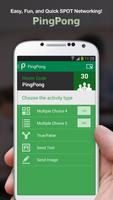
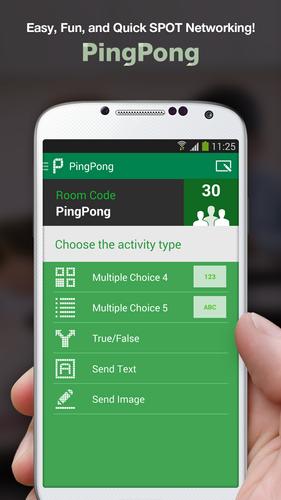
The Host can ask for responses with different methods such as true/false, text, image, etc.
4. Quick results
Guests' responses can be checked in real time with graphs, lists, etc.
5. Link to Evernote
Materials saved in the Host's Evernote can easily be loaded and shared with the Guests.
6. Convenient tool
Fun to use with functions such as the timer and random selection.
▣ Difficulties in proceeding..
Disorganized situations where people are chatting and not paying attention..
Awkward situations where people are asking questions not related to the subject..
Situations where you're wondering whether people understand the subject or whether you're explaining things that they already know about..
These situations are all experienced by Host's who host lectures, classes, and events.
It is really hard to get peoples' attention and bring fun to places where many people are gathered.
However, these problems can all be solved when you use Easy, Fun, and Quick PingPong.
▣ Here's how to use PingPong:
1. Speeches, Seminars
Use the [Send Text] function when you want to induce audience questions.
Use the [Send Image] function when you want to organize hosts' business card.
2. Classes, Lectures
Use the [Multiple Choice 4] function when you are curious about students' understanding.
Use the [True/False] function when you are doing a quiz contest.
Use the [Send Image] function when you draw your teacher's or friend's face.
3. Discussions, Meetings
Use the [Load Evernote] function when you want to show meeting materials.
Use the [Share Evernote] function when you want to share minutes from the meeting.
4. Events
Use the [Random Selection] function when you want to draw for winners.
Also you can apply PingPong usefully in many other different situations.
▣ Main Functions
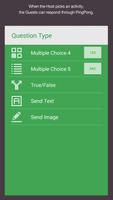
Multiple Choice 4
Multiple Choice 5
True/False
Send Text
Send Image
Load Evernote
Share Evernote
Timer
Random Name
Presentation
Start using PingPong right away-
it's Easy, Fun, and Quick SPOT Networking!
▶ Contact Us
• Homepage : http://gogopp.com
• E-mail : [email protected]
Lastly, it is now available to make PingPong Room Code with ‘Linked in’ account.
Enjoy PingPong with my precious acquaintances!







 Download