

Enjoy millions of the latest Android apps, games, music, movies, TV, books, magazines & more. Anytime, anywhere, across your devices.
Updated to Support Pebble 2.0 firmware:
- Watch battery indicator on main screen (2.0)
- Watch vibrates and show message in main screen when looses connection with phone (2.0)
- You can disable notification sound on preferences
- You can now set silence period for not sending notifications to watch (for example by night). In Preferences.
Updated
- Yahoo weather added. Set it on Preferences or change between openweathermap and Yahoo with three taps on UP button
- Double tap on UP button to see next event
- Now you can start watchapp from Tasker sending an intent with com.ichueca.pebblealarm.START_WATCHAPP (in Actions Misc.)
- Calendar view with events (double tap on SELECT on weather watchface). Select event day with UP / DOWN (change month with double tap). View events from that day with SELECT and, in detailed view, tap SELECT for next event (doyuble tap for previous)
- Weather detailed view with double tap in DOWN button in weather screen
- Thanks to Miles for helping in message translation.
Now with WatchFace
- Shows current time and temperature (set celsius / fharenheit in preferences screen)
- Shows moon phase
- Shows seven day weather based on location (data from openweathermap.com). Tap UP button for refresh weather, MIDDLE button for WatchApp options, DOWN button for next days weather
- Added a Take Remote Photo option on utils.
See http://forums.getpebble.com/discussion/comment/41554/ for instructions
WatchApp Features
- View Mobile Data, GPS and Battery Status. View / change WIFI, Ringer Mode and Music Volume
- Keep track of notifications from your phone on Pebble (Tap Select button for Next notification, two taps for Previous, two taps on Up button for first notification and two taps on Down button for last).
- Find My Phone and Find My Car features (in Utils Set your car location and later use Find My Car feature. It starts Navigation and send indications to watch. Make sure GPS is ON and Maps is added to Manged Notifications App)
- Experimental. Confirm (or confirm and delete) reminders on watch. You must activate this option in settings.
Download and install the WatchApp from Manage Notifications option on main screen.
Set how much notifications you like to track on preferences (also if you want to send a message to Pebble for them. If you do, remove other notification app on the phone or you get multiple times the same notification)
Added backup / restore options for reminders and apps to track.
SPECIFICATIONS
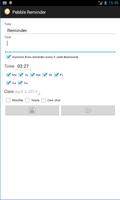
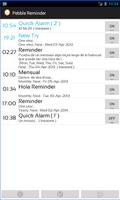
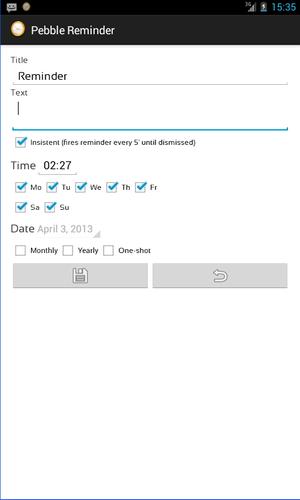
Set Reminder and Quick Alarms on phone with Pebble support and activate / deactivate / delete them.
Reminders on weekdays and one-shot reminders.
One-shot reminders and quick alarms may be deactivated / deleted based on preferences
Put Wheater as title of a reminder and send the weather on your location to pebble
Message is sent to Pebble on low battery on phone
Make your phone vibrate and sound (default alarm tone) when pebble looses connection with phone (in Preferences).
Use it to find your phone. Just turn off the Bluetooth on Pebble and your phone starts to sound
Insistent alarms. Repeating alarms each 5' until dismissed on phone
Sort reminders alfabetically, by date or by date to come (preferences)
Highlight today reminders (preferences)
Send message to pebble when phone battery raises specified level (preferences)
Now the reminder list shows the next reminder date
Please, email me if the app is malfuncioning.
NOTE: if you want to help with translating Pebble Reminder to another language just email me.
- Watch battery indicator on main screen (2.0)
- Watch vibrates and show message in main screen when looses connection with phone (2.0)
- You can disable notification sound on preferences
- You can now set silence period for not sending notifications to watch (for example by night). In Preferences.





 Download