

Hardcore straight-forward way to learn Multiplication through TABLES and FACTORS
Hardcore straight-forward learning method of Multiplication through TABLES and FACTORS (includes prime factors too).
Presents you with a list of tables (1 to 99) to choose from.
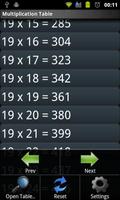
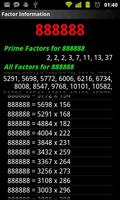
Move through the tables by casually swiping the screen to the left or right. Click on any line in the table to load the factors of all the numbers in the line (makes it easy to remember)
Choose 'Endless Table' mode to continuously keep increasing the table range till 999.
No more need to remember an infinite number of tricks to multiply two numbers. Just practice with this and you'll remember them forever.
This version is for devices running Android Version >= 2.1
If your device run's on Android Ver < 2.1 then search for 'Maths Multiplication Legacy' or 'com.felix.legacy.multiplication' in the Android Market.
####Features####
1. Open “Multiplication Tables” from the home screen to view the tables of a number from 1 to 20 (Try ‘Endless Mode’ in Settings). Click on any item to open it's quick factor info. Long click for loading the table, factors or Grid of all the numbers present in the table item.
2. Open Numbers Grid to load a grid of numbers. The grid is an Endless list of numbers. Clicking on any number will load it’s factors. Long click any number below 100 to load it’s table.
3. Open “Load Table” and enter a number (1 to 99) to load it’s Multiplication Table. Click on any item to open it's factor info.
4. Open “Find Factors” and enter a number (2 to 999999) to load it’s Prime Factors and All Factors. You can further search by clicking on the Options menu and selecting “Find Factors”
Open Squares (x^2), Cubes (x^3) and Powers (x^y) from x=2 to 100.
5. Long Click on table's in either Tables view or Factor's View to select numbers to load their tables, factors (again) or Grid.
Press Volume Up/Down to load prev/next item.
### Options Menu ###
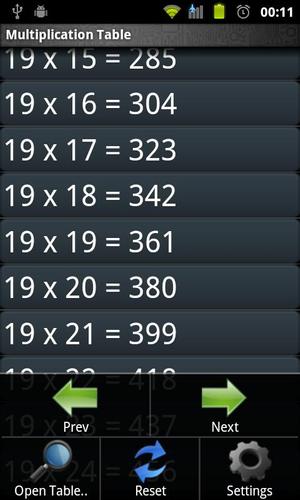
Previous: Loads the Previous Multiplication Table
Next: Loads the Next Multiplication Table
Open Table..: Opens the Multiplication Table of the specified number (1-99)
Reset: Resets/Refreshes the current table to it’s default preferences.
Settings: Opens the Preferences for Multiplication Table View.
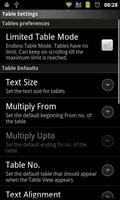
### Table Preferences ###
Limited Table Mode: Tables load from a specified from value to a specified to value (which can be set in the settings).
eg:
2 x 1(From) = 2 to
2 x 20(To) = 40
Endless Table Mode: Tables Load Continuously as you keep on scrolling from a specified value to 999.
eg:
2 x 1(From) = 2 to
2 x 999(Loads Dynamically) = 1998
### Table Default Settings ###
Text Size: Set the text size for all the text in the Multiplication Table View. Minimum size required for visibility purposes is 10.
Multiply From: The default beginning From value to start multiplying from.
Multiply Upto: Default ending To number to end the multiplication at.
Table No: This is the default Table No. that the application should load when it is first started. The application remembers the last visited Table and loads it by default every time.
Text Alignment: Specifies the alignment of the Table’s text (Left, Center, Right, etc)
### Color Preferences ###
Use Theme: The Theme that should be applied to the table’s and popup’s. Four theme’s are provided by default – Blue, Red, Pink and White.
Disable Theme: Disable’s the theme mode. No background effects are applied when this is selected. But when the theme’s are enabled, the option to select the text-color is available.
Table Text Color: The Color of the numbers that appear in the multiplication table view – Black, Blue, Cyan, Dark Gray, etc.
Text Background Color: The background color of the Table text. This is disabled if the theme mode is enabled.
Separator Color: The color of the Separator lines and the Table List’s background. This is also disabled if the theme mode is enabled.
A great math workout tool for you.
Keywords: Maths, Multiplication, Factors, Tables, Learn, Algrebra, Workout, Multiples, Factorization, Addition, Subtraction, Division.
Thanks for the guy who reported it.





 Download