

Learn the countries apps connect to and block apps with LostNet NoRoot Firewall.
Learn which apps are chatting via Internet behind your back. See which countries they send your data to. With simple and effective LostNet NoRoot App & Geo Firewall, you'll stop all communications that you don't need!
WIth LostNet NoRoot Firewall you will be able
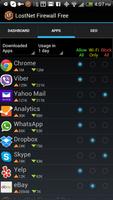
- to block Internet access for any app. Let LostNet Firewall provide full Internet access to an app or access only in Wi-Fi networks or no access at all.
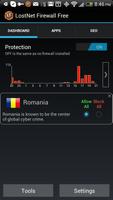
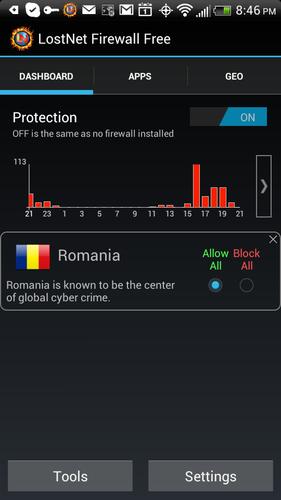
- to block access to any country/region for all your apps. Use LostNet Firewall to prevent your apps from connecting to the countries you don't trust or don't want to deal with.
- to block background activities of your apps. Surprisingly a lot of apps generate traffic while they are in background mode. LostNet Firewall may decrease your data consumption by blocking these apps.
- to capture packets (sniffer!) sent to and from your device with the sniffer tool and to analyze them using CloudShark.org. The sniffer tool of LostNet NoRoot Firewall allows you to learn details about the data your apps are sending. Use the sniffer tool to check whether your personal info is sent out. Also use the sniffer to debug applications.
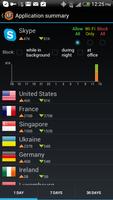
- to monitor amount of data consumed by apps. This information is extremely useful if you don't have unlimited data plan. For example, use LostNet NoRoot Firewall to compare background data consumption by Skype, Viber and Whatsapp to choose which one is better for your data plan.
- to track the countries your apps are connecting to. This way LostNet Firewall Helps to detect suspicious apps and spyware.
- to receive instant notifications. Get notified when a blocked app tries to connect to Internet or when some app tries to connect to a blocked country.
- to block ad networks. As LostNet NoRoot Firewall intercepts traffic from all apps, it is capable of removing traffic to certain ad networks.
- to create multiple profiles in order to switch between specific rules for different situations. Profiles can be very useful when you want to set different rules while you are in roaming or for example when your children use your Android device.
- to save your battery life. Most of your apps perform periodic activities which bring your wireless connection on and, thus, drain your battery really fast. LostNet NoRoot Firewall can block these activities.
Features
* NO ROOT required. All features work WITHOUT rooting
* Virtual (fake) VPN connection to control your apps. We don't tunnel your packets anywhere!
* Simple user friendly interface
* Minimum system permissions required
* Block Internet connections for any app
* Block connections to countries/regions
* Block ad networks
* Block background activities of your apps
* Packets sniffer. Capture packets sent from your device and analyze them on CloudShark.org (compatible with WireShark and tcpdump)
* Monitor per country data usage by app
* Monitor countries your apps are connecting to
* Create profiles to set specific rules for different situations (ex. roaming)
* Helpful notifications on your app activities
* Ads Free
* Saves battery life
* Intelligent suggestions to improve your Internet experience
* On/Off protection switch and widget
* Automatic launch on device restart
LostNet App and Geo Firewall Pro is available with additional features
* Malware shield. Block known malicious networks and web sites
* Block untrusted/suspicious apps in your office network (BYOD firewall)
* Block your apps during night hours
* Use sniffer without any restrictions
* View data usage on per month basis
* Switch off alert notifications


 Download