

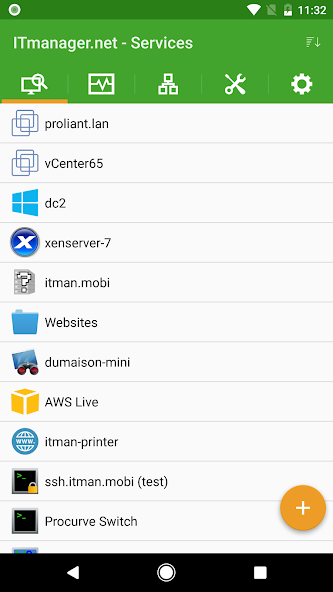
Remote network management for Windows, VMware, Active Directory, iLO and iDRAC
Remotely monitor and manage servers from any mobile or desktop device with ITmanager.net including:
- Windows
- VMWare
- Active Directory
- iLO and iDRAC
As well as Microsoft Exchange, Office 365, Hyper-V, XenServer, XenApp, SSH (Secure Shell), Telnet, Amazon Web Services (AWS), RDP, VNC, Apple Remote Desktop (ARD) and more, anywhere, at anytime.
***PLEASE NOTE***
The ITmanager.net service includes an optional enterprise server which is installed on a Windows server behind your firewall. The enterprise server can be downloaded here: http://www.ITmanager.net/download/ The enterprise server enables monitoring and management of servers behind firewalls without opening any ports in the firewall. Connections to the enterprise server are encrypted for security. The enterprise server supports multiple users.
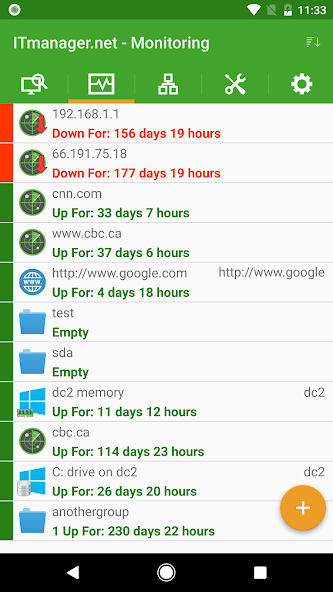
Monitor:
- Monitor servers with Ping, HTTP, TCP Ports, Windows CPU, Disk space, Memory, Service and SNMP Network usage
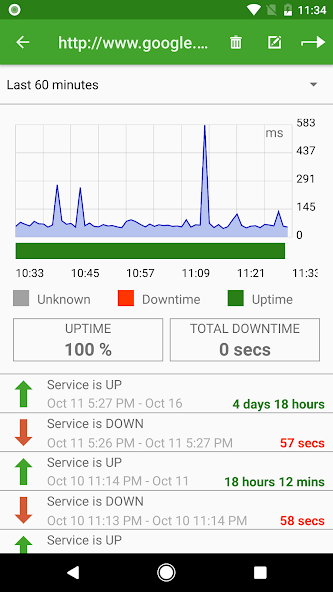
- View graphs and charts of response times
- Configure thresholds when servers are down, slow or returning error codes
- Notifications sent to Email, SMS, iOS or Android Push.
- Notify multiple users based on different start time and repeating criteria
- Monitor servers on the Internet as well as servers behind the firewall
- Integrates with PagerDuty
Windows:
- System Information
- Services
- RDP
- Shutdown & Reboot
- Event Viewer
- File Explorer
- Powershell
- Task Manager
- DHCP Manager
- DNS Manager
- Shares
- Task Scheduler
- Printers
- VNC
- Session Management
- Local Users & Groups Management
Active Directory:
- Users management
- Group management
- Browsing or searching the Active Directory Tree
VMware vSphere vCenter and ESXi:
- Start or stop vSphere vCenter servers or ESXi hypervisors
- Reset vSphere vCenter servers or ESXi hypervisors
- View vSphere vCenter or vSphere ESXi statuses and see screenshots
- Connect to the console using SSH and VNC
HP iLO & Dell iDRAC:
- See System Health and all device information
- Power Off, Power On and Reset Systems
- Enable and disable the UID identifier lights
- Change One-time Boot options. See Screenshot of server
Microsoft Exchange:
- Create, edit and delete mailboxes and groups
Office 365:
- Create, edit and delete User & Groups
- Reset User Passwords
- Manage Licensing and Assign Licenses
Hyper-V and XenServer:
- Start, stop and reset virtual machines
- View virtual machine statuses and see screenshots
- Connect to the console
XenApp:
- Disconnect, logout and send messages to sessions
- Manage applications, machines and delivery groups
Telnet and SSH (Secure Shell):
- Telnet client for connecting to remote devices which are running a telnet server
- SSH (secure shell) client connects to devices running SSH servers
- SSH (secure shell) is very similar to telnet but is encrypted, hence the name secure shell
VNC and RDP:
- RDP (Remote Desktop Protocol) client for connecting to Windows servers running RDP server
- VNC client connects to any computer running a VNC server
- View the screen and control the mouse and keyboard
Apple Remote Desktop (ARD):
- Apple Remote Desktop (ARD) for managing Mac computers
- View the screen via Apple Remote Desktop (ARD)
- Control the mouse and keyboard via Apple Remote Desktop (ARD)
Network Tools:
- Ping, Traceroute, Whois, Subnet Calculator,
- DNS Lookup
- Scan network to discover servers automatically
Amazon Web Services (AWS)
- Manage EC2, IAM, S3, Elastice Beanstalk
Google Workspace
- Manage Users, Groups, Buildings
- Manage Devices, Printers, Chromebooks
- Reports, Domains
A FREE 14 day subscription is provided to all new ITmanager.net users. Purchasing a subscription will allow you to use the application on all of your mobile devices as well as through any web browser with our web app.






 Download