

Manage, share your 3G/4G/5G network and share files easily! (Make QR Code)
HotSpot Tethering can manage Wi-Fi hotspots and offer several kinds of rules to turn on, turn off or restart the mobile hotspot automatically, even if the mobile is under locked state or far away from you.
Share files with any other device via WiFi hotspot even without Internet. A QR code can be generated to fast share! Builtin picture viewer is easy and useful!
It need NOT Root the phone to use all the function! Now download and install for free! :)
<< Features >>
1. Quickly switch hotspot or open settings to share 3G/4G/5G telecom network as a WiFi Access point (AP).
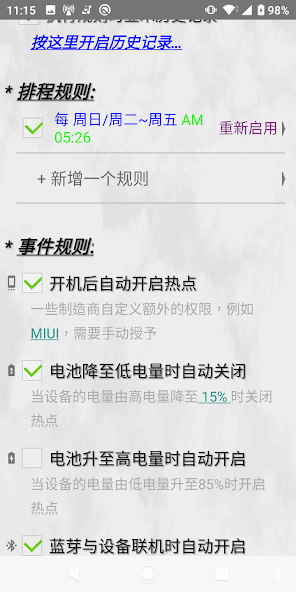
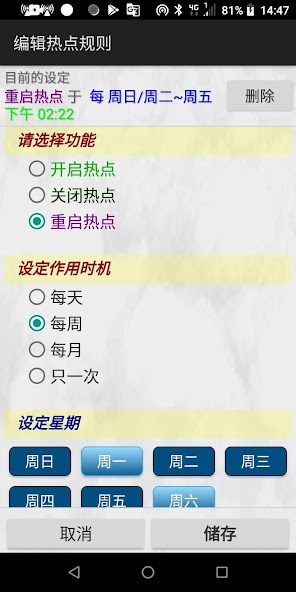
2. Schedule hotspot: automatically enable, disable or restart hotspot by various date time rules, and view the action log
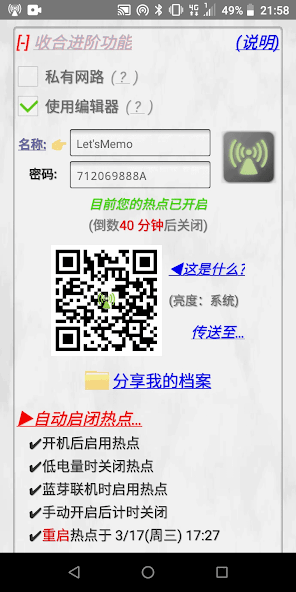
3. Events trigger: phone booting / bluetooth device connecting / battery level low or high to disable or enable hotspot / countdown to turn off hotspot, and still more...
4. Manage hotspot: edit hotspots, create random passwords (8~63 characters), generate QR code for others to scan and tether with. No need remember and keyin, only a few taps to change to another hotspot. ( Demo video: https://youtu.be/GtLsX-VaKzA )
On Android 8 or later device, you have to enable the app Accessibility in system settings to run this function. Please refer to the detail: https://letsmemo.blogspot.com/2023/01/announce-usage-for-app-accessibility.html
5. Share files via hotspot or Wi-Fi: config your shared folder, generate QR code for other devices to scan and access directly. Builtin client picture viewer to navigate quickly, not need install extra software. Fast transfer files via Wi-Fi to others mobile and PC even without internet.
6. Desktop, app icon and notification bar shortcuts to step into relative settings, toggle hotspot, invoke QR code for scanning to tether with or get files!
7. FAQ unit offers the tips about Wi-Fi hotspot.
8. No evil: it does not collects your personal privacy, nor show annoying ads, Please feel free to use!
<< Motivation >>
* I share my network with family by my backup mobile but I leave to travel, and my phone crashes or no power. They have to restart it, no one know how to unlock the screen... How could they do?
* I want to share my network in certain time. For instance, I only want to share at the weekend night ...
* I don't need to share network with the kids at the mid night, but my other devices need the network. I have to change the hotspot to another settings ...
* I want to share my network with new customers for ten minutes by a random password hotspot... Can they tether to my hotspot by a quickly scan?
* Hotspot is often in used and forget to turn it off before the phone power is drain out? I need make important calls and reply emails any time ...
* When I enter my car, I hope the hotspot automatically be enabled by detecting the bluetooth connectiing so that it can share the network with my another GPS device, but my phone is in the handbag in the rear compartment...
* During a group discussion, the telecom signal here is poor and the Internet cannot be accessed. How do I send the picture materials and report files to my friends' iPad and laptop?
For these cases all I need do is just to open the relative module of this app, and set a rule or tap some checkbox, then those tiny things would never bother me anymore. :)















 Download