• Home
  • Games
    Action-adventure Simulation Business Role Playing Sports Competition Casual Intelligence Card Strategy Music Rhythm Text Puzzle Flying Shooting Love Development
  • Apps
    Business Office Newsletter Social Life Entertainment Online Shopping Practical Tools Travel Financial Management Educational Learning Information Reading Sports and Health
  • Articles

English 中文(简体) 中文(繁体) 한국어 日本語 Português Español Русский العربية Indonesia Deutsch Français ภาษาไทย
Home Apps Educational Learning Hello Crayon
Hello Crayon

Hello Crayon

1
2
3
4
5
Download
  • Version 1.803
  • Category Educational Learning
  • Package Name com.raysoft.hellocrayon
  • Update Time December 17, 2025
  • Size 21.63MB
About this app

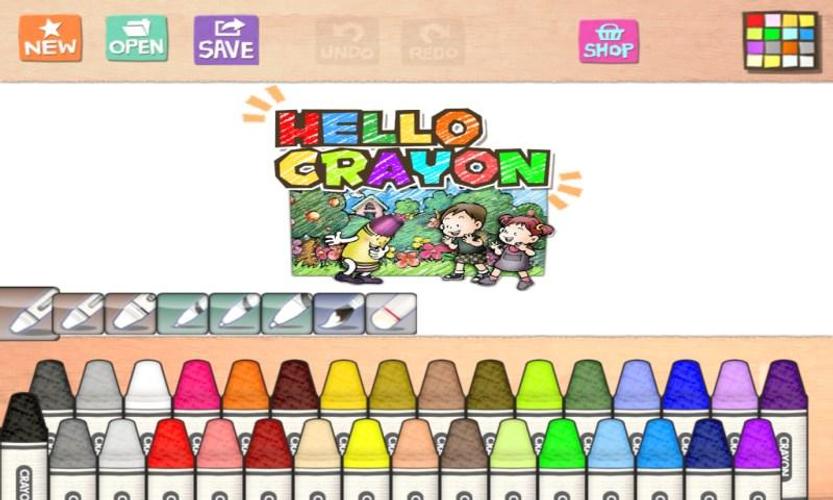
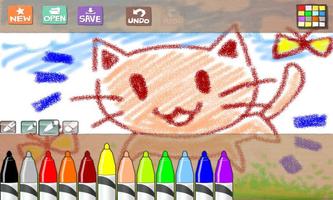
Hello Crayon is an easy & fun drawing APP for children.

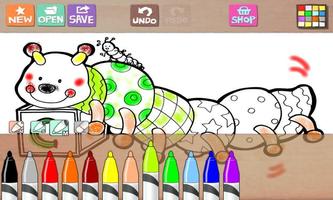
Hello Crayon is an easy & fun drawing APP for children. It provides realistic crayons and marker pens.

You can buy more crayon tools and drawing books by in-app-billing shop.

Features

- Realistic look & feel of crayons and marker pens

- Cool drawing sound

- Intuitive user interface

- Free 8 coloring sketches for coloring

Check out our hello drawing series.

- Hello Crayons

- Hello Color pencils

- Hello Chalk

Facebook

http://www.facebook.com/pages/Hello-Crayon/128107603937551

===================================================================

This app requires following mandatory permissions

1. Read/Write External Storage

- Modify / delete the contents of the SD card

- Test Access to Protected Storage

-> Save your app-drawn artwork (picture) to SD card or protected storage

2. Other

- Full network access

-> Share pictures on social networks such as Facebook

- Google in app billing services

-> Use Google's in app billing service to purchase sketches and full versions

==================================================================

====

This is the notice for updated version of 'Hello' Series and 'Water Color Pencil' app, related to function of 'Image Save to External Storage.'

If you have device with Android JellyBean or previous version, when you save image to exteral storage, image files will be saved to exteral storage folder with App Name and immediately you can show that image on Gallery. (This is the conventional rule of older version of Hello Series and WCP app.)

If you have device with Android KITKAT, when you save image to exteral storage, image files copied on Camera Folder of your external storage. Surely, you can see your image on Gallery. If you got the toast message 'Cannot Save To Camera Folder' when save image, please execute basic 'Camera' app of device and make one or more photo. After that, you can save image to camera folder successfully.
What's New in the Latest Version 1.803

Last updated on May 7, 2019 Support 64bit Hardware
Download(21.63MB)
Users also viewed
  • Provas do Detran e Simulados

    Provas do Detran e Simulados

    2.3.3 January 13, 2026
  • Preu PDV

    Preu PDV

    6.0.1 January 13, 2026
  • Find The Famous Person

    Find The Famous Person

    1.9.1 January 13, 2026
  • Genggam Internet

    Genggam Internet

    1.0.3 January 13, 2026
  • EXOTEACH

    EXOTEACH

    6.22 January 12, 2026
  • The Word For Today

    The Word For Today

    6.10.11 January 12, 2026
  • TX Driving Test Lite

    TX Driving Test Lite

    1.3 January 11, 2026
  • Virtual Receptionist

    Virtual Receptionist

    3.6.1 January 11, 2026
  • Mental Dictionary

    Mental Dictionary

    1.2 January 11, 2026
  • AvenirSuper

    AvenirSuper

    1.2.3 January 11, 2026
  • LearnSmart

    LearnSmart

    2.9.1033 January 11, 2026
  • teach.NSW JobFeed Mobile

    teach.NSW JobFeed Mobile

    2.0.0 January 11, 2026
  • Bengali Umrah Dua ওমরাহের দুআ

    Bengali Umrah Dua ওমরাহের দুআ

    1.6 January 10, 2026
  • My VMware

    My VMware

    2.8.2 January 10, 2026
  • DAIKIN Refrigerants

    DAIKIN Refrigerants

    9.00 January 10, 2026
About Privacy Policy Terms of Service Cooking Policy

© Copyright 2017-2026 downzq.com