• Home
  • Games
    Action-adventure Simulation Business Role Playing Sports Competition Casual Intelligence Card Strategy Music Rhythm Text Puzzle Flying Shooting Love Development
  • Apps
    Business Office Newsletter Social Life Entertainment Online Shopping Practical Tools Travel Financial Management Educational Learning Information Reading Sports and Health
  • Articles

English 中文(简体) 中文(繁体) 한국어 日本語 Português Español Русский العربية Indonesia Deutsch Français ภาษาไทย
Home Apps Practical Tools Fake Finger Scanner
Fake Finger Scanner

Fake Finger Scanner

1
2
3
4
5
Download
  • Version 1.2.9
  • Category Practical Tools
  • Package Name com.blogspot.solarflarelabs.fingerscanner
  • Update Time January 31, 2026
  • Size 3.69MB
About this app

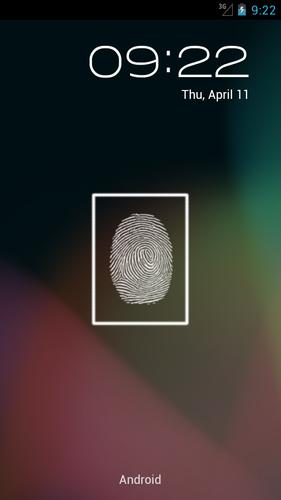
Try the best finger scanner prank app on market!

Fake Finger Scanner is the first fake fingerprint scan app in the Android Market to work as a default screen lock for your phone. Introducing an easy-to-use design and many customizable options, Fake Finger Scanner is highly adaptable to your requirements. Whether you want to prank your friends or are just looking for a believable fingerprint locker, Fake Finger Scanner is sure to deliver!

Fake Finger Scanner is designed from the ground up to function as a fully-featured screen locker. Main features include:

- Set as default locker (persistent through phone restarts)

- Transparent background, compatible with custom and live wallpapers

- Notification bar toggle

- Time and date display

- Sound toggle

- Customizable finger scan duration

- Override Home Button*

Note: Fake Finger Scanner can't actually scan your finger print, as touchscreens are not designed with the ability to scan finger prints. Instead, Fake Finger Scanner uses a secret button that only you will know about, so that only you can unlock your phone, making it look like the scanner only accepts your fingerprint.

* On some devices with specific launch configurations, the Override Home Button feature may allow your Home Screen to be displayed for up to 5 seconds. To fix this behaviour, make sure you have two or more launchers available and do not have a default launcher set. This can be done by navigating to Settings > Applications > Manage Applications and finding your default launcher on the list. Select it and tap the Clear Defaults button. The Override Home Button feature will now work as intended, keeping your device locked immediately during Home Button presses.
Download(3.69MB)
Users also viewed
  • Neon Keyboard for Galaxy Y

    Neon Keyboard for Galaxy Y

    1.279.1.93 March 3, 2026
  • Live Wallpaper Creepy Crawlies

    Live Wallpaper Creepy Crawlies

    1.8 March 3, 2026
  • Random name picker for raffles

    Random name picker for raffles

    2.1.2 March 3, 2026
  • Root Checker N Info

    Root Checker N Info

    2.0.5 March 2, 2026
  • UR 3D Solar System Live Theme

    UR 3D Solar System Live Theme

    9.06.4.1 March 2, 2026
  • Mirror Photo - Mirror Pic

    Mirror Photo - Mirror Pic

    1.0 March 2, 2026
  • My Battery Drain Analyser

    My Battery Drain Analyser

    0.941 March 2, 2026
  • Theme for Lg Home- Lollipop

    Theme for Lg Home- Lollipop

    1.2 March 2, 2026
  • Mask of zorro Protector Theme

    Mask of zorro Protector Theme

    1.0.0 March 2, 2026
  • Radar de Huracanes

    Radar de Huracanes

    2.7 March 2, 2026
  • Labrador Lock Screen

    Labrador Lock Screen

    5.0 March 1, 2026
  • Kitchen Set Minimalis

    Kitchen Set Minimalis

    1.0 March 1, 2026
  • Go Elegant Minimalistic

    Go Elegant Minimalistic

    1.0 March 1, 2026
  • Air Pollution

    Air Pollution

    1.0.0 March 1, 2026
  • Clima Simple

    Clima Simple

    1.0.0 March 1, 2026
About Privacy Policy Terms of Service Cooking Policy

© Copyright 2017-2026 downzq.com