

Extract and download all email attachments from your Gmail™
Mail Attachment Extract and Download for Gmail™
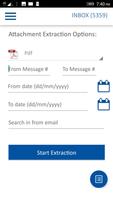
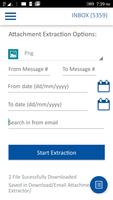
Extract email attachments from your Gmail™ mailbox. Email Attachment Extractor lets you extract attachments and save them in the device automatically.
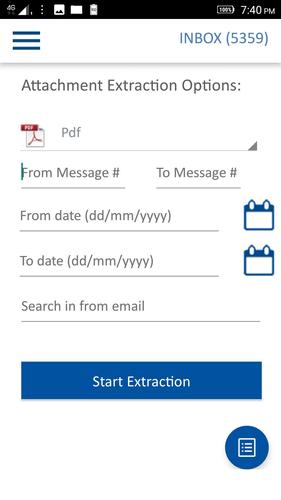
Following features/options are available:
- Choose any Gmail™ account configured in your device.
Filter by "From:" email
- Only extract attachments received from a known sender. You can enter first name, last name or domain name part of your email for faster search and extraction.
Message Range:
- Enter email message number in From and To boxes. Choose email message numbers from which to extract the attachments. For eg: between emails from 100 and 500
Date Range: Filter between dates
- Enter date of received emails and extract attachments received within a date range.
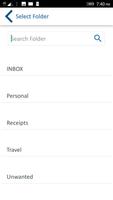
Select mail Folder.
- Select a mail Folder to extract the attachments from emails in that folder.
Choose Inbox or any Label from your Gmail to extract attachments.
Select attachment type:
- Select the type of attachment to extract. For example: .pdf, .docx, .zip etc.
Option to extract only a particular type of attachment. This is more quicker than extracting all types of attachments. For example, you can choose to quickly extract only .pdf files from your emails.
Use Pro to extract all types of attachments.
Tap on the "FileList" icon to see the list of extracted files. View the files using any compatible viewer installed on your device or use the Share icon to share the file through Email or upload to any file storage service like GDrive etc.
Privacy: Safe and secure as your account credentials are with Google. No personal information is collected or transmitted to third party.
All trademarks are the property of their respective owners.
Email Attachment Extractor Help:
1. Click on "Sign in with Google" button
If more than one Gmail account is configured in your device, you will be prompted to choose a Gmail account.
2. Click "Allow Access" to allow this app to access your Gmail account.
3. After successful sign-in, you will see the list of Folder/Labels in your Gmail account.
Select Inbox or any other Label from which you want to extract the attachments.
4. Choose one or more extraction options
5. Click "Start Extraction" to proceed.
Extracted attachments are saved in a sub-folder named "Email Attachment Extractor" in your /downloads folder. Tap on the "FileList" icon to see the list of extracted files.
For extracting attachments from other email accounts( other than Gmail) use "IMAP Attachment Extractor"
https://play.google.com/store/apps/details?id=com.pppimapattachmentextract








 Download