• Home
  • Games
    Action-adventure Simulation Business Role Playing Sports Competition Casual Intelligence Card Strategy Music Rhythm Text Puzzle Flying Shooting Love Development
  • Apps
    Business Office Newsletter Social Life Entertainment Online Shopping Practical Tools Travel Financial Management Educational Learning Information Reading Sports and Health
  • Articles

English 中文(简体) 中文(繁体) 한국어 日本語 Português Español Русский العربية Indonesia Deutsch Français ภาษาไทย
Home Apps Practical Tools Data Usage Analyzer
Data Usage Analyzer

Data Usage Analyzer

1
2
3
4
5
Download
  • Version 1.19.2624
  • Category Practical Tools
  • Package Name com.andcreate.app.trafficmonitor
  • Update Time June 20, 2026
  • Size 12.97MB
About this app

Monitor and optimize data usage with data analyzer and bandwidth tracking app.

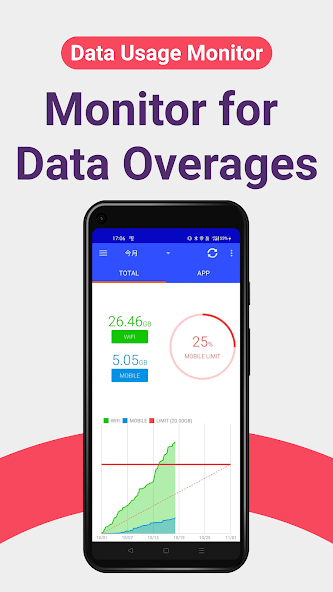
“Data Usage Analyzer" is a user-friendly app for you to manage your data usage. “Data Usage Analyzer" helps you to accurately measure your daily data traffic, and analyze the data in a way easy to understand. It also pops up warnings when you are reaching the data traffic limit, which protects you from data overuse. Please try “Data Usage Monitor" to manage your data usage and plan the best way to control your data traffic!

・ Automatic Data Traffic Measurement – Once you launch the app, it will then measure your data traffic automatically. Whenever you are concerned about your data usage, simply launch the app to check!

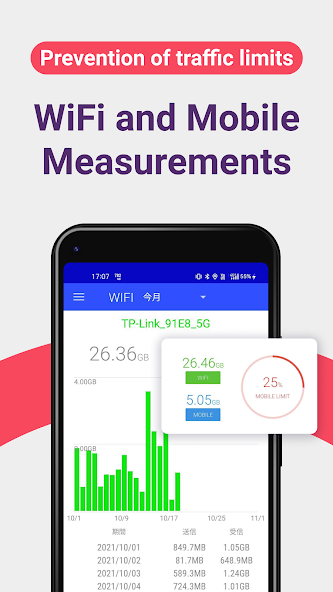
・ Precise Measurement on the Data Usage – It measures precisely the data usage of your smart phone. Don’t worry! This app can accurately measure between any time intervals. For Wi-Fi data usage, it is sorted by SSID!

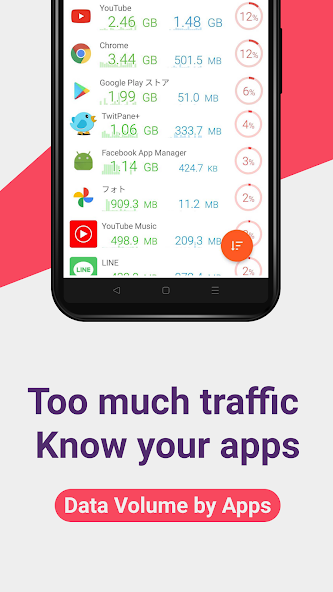
・ Easy-to-read Statistics Interface – Measured usage is separated in terms of Wi-Fi and Mobile displayed in graphs that are easy to read. What’s more, you can sort by app data usage, so you know which apps are the most data-consuming!

・Premium Features – Premium users can enjoy features such as the display of data traffic on the home screen by using our app widget!


What's New in the Latest Version 1.19.2624

Last updated on Dec 11, 2024 Ver 1.19.2624
- Fixed a bug that caused the app to crash when opening the mobile details screen on some devices.
- Fixed a rare bug that caused traffic volume data to not load on startup.

Ver 1.19.2614
- Adjusted the UI of the top screen and graphs.
- Added a detailed screen for mobile data usage.
- Added a list of data usage by time period to the detailed screen.
- Added an item for "pausing unused apps" to permission management.
Download(12.97MB)
Users also viewed
  • NterNow

    NterNow

    2.7.8 June 20, 2026
  • Battery Watch - Big Numbers

    Battery Watch - Big Numbers

    31 June 20, 2026
  • Menu FEUP

    Menu FEUP

    1.2 June 20, 2026
  • Whale Home

    Whale Home

    1.0.1 June 20, 2026
  • Lock Unlock for Aadhara card

    Lock Unlock for Aadhara card

    4.3 June 20, 2026
  • DiffWeather - yesterday vs

    DiffWeather - yesterday vs

    1.0 June 20, 2026
  • Buypass Code

    Buypass Code

    2.5.0 June 20, 2026
  • Cell Coverage Map

    Cell Coverage Map

    4.1 June 20, 2026
  • AlertaCOE

    AlertaCOE

    1.3.7 June 20, 2026
  • SunBeam

    SunBeam

    1.2 June 20, 2026
  • Allerta Meteo

    Allerta Meteo

    1.5 June 20, 2026
  • WeatherBoard

    WeatherBoard

    3.2.1 June 20, 2026
  • Dynamic Live Wallpaper

    Dynamic Live Wallpaper

    1.3 June 20, 2026
  • Kryptomat

    Kryptomat

    1.2.1 June 19, 2026
  • Fotolia Instant

    Fotolia Instant

    1.2.1 June 19, 2026
About Privacy Policy Terms of Service Cooking Policy

© Copyright 2017-2026 downzq.com