• Home
  • Games
    Action-adventure Simulation Business Role Playing Sports Competition Casual Intelligence Card Strategy Music Rhythm Text Puzzle Flying Shooting Love Development
  • Apps
    Business Office Newsletter Social Life Entertainment Online Shopping Practical Tools Travel Financial Management Educational Learning Information Reading Sports and Health
  • Articles

English 中文(简体) 中文(繁体) 한국어 日本語 Português Español Русский العربية Indonesia Deutsch Français ภาษาไทย
Home Apps Business Office Chaozhuyin
Chaozhuyin

Chaozhuyin

1
2
3
4
5
Download
  • Version 3.4.9
  • Category Business Office
  • Package Name tw.chaozhuyin
  • Update Time December 26, 2024
  • Size 50.94MB
About this app

Chaozhuyin is a Chinese phonetic symbol keyboard.

Chaozhuyin is a Chinese phonetic symbol Input Method (Bopomofo IME). It is very easy to use with zero learning curve.

Features:

● To input a Chinese phrase, you only need to input the first phonetic symbol of each word, and you can add any remain symbols arbitrarily to narrow down the candidates you may want.

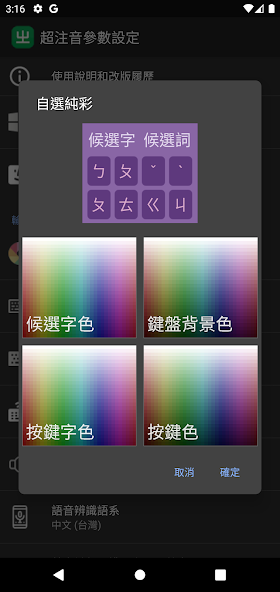
● Provide several kinds of skins and colors of the soft keyboard. Keyboard and font size can be adjusted freely.

● Proximity correction: it'll smartly guess what word or phrase you want to input from neighbor keys.

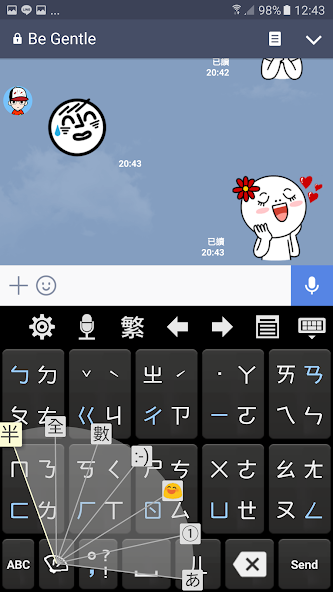
● Swiping keyboard.

● English input method.

● Keyboard fan-shaped selector.

● Candidate selection dropdown.

● "Smart proximity correction" feature.

● You can remove your user phrase now.

● Eten keyboard layout.

● Up/down/left/right arrow keys, and voice recognition button.

● Move the system phrase database file to and from SD card.

● Backup/restore user phrase by yourself.

● With great functionality of word or phrase guessing.

● Support mobile and tablet devices, support hard keyboard.

● Able to import Chinese names in your contacts.

● Able to output Simplified Chinese.

● Support Android 4+.

This version can be used for free for 28 days with full functions. During the trial period, there will be a banner ads at the bottom of the setting screen. After the trial period, the following functions will be closed:

● Swiping keyboard.

● Keyboard fan-shaped selector.

● Candidate selection dropdown.

● Word or phrase guessing.

● "Smart proximity correction" feature.

● English input method.

● Up/down/left/right arrow keys.

● Voice recognition button.

● Import Chinese names in your contacts.

● Move the system phrase database file to and from SD card.

● Backup/restore user phrase by yourself.

● Remove your user phrase.
What's New in the Latest Version 3.4.9

Last updated on Aug 6, 2024 Ver 3.4.9:
* Long pressing the delete key will delete all the symbols that are being typed.
Download(50.94MB)
Users also viewed
  • GuoouMaster

    GuoouMaster

    1.0.14 March 4, 2026
  • Ionic 3 Social Media App Templ

    Ionic 3 Social Media App Templ

    0.0.2 March 4, 2026
  • Dental CPD Pro

    Dental CPD Pro

    1.01 March 4, 2026
  • SLAMBench

    SLAMBench

    1.0-11 March 4, 2026
  • New XLife

    New XLife

    3.60 March 3, 2026
  • The AddressBook to communicate

    The AddressBook to communicate

    1.2.3 March 3, 2026
  • Asistente Agenda

    Asistente Agenda

    3.7 March 2, 2026
  • PlanPlus Online Shortcut

    PlanPlus Online Shortcut

    1.0 March 2, 2026
  • All Document Reader

    All Document Reader

    2.0.21 March 2, 2026
  • Quilicura Inteligente

    Quilicura Inteligente

    1.0.0.6 March 2, 2026
  • Leopard

    Leopard

    2.1 March 2, 2026
  • Mr.Box2 -Magic Finger Plugin

    Mr.Box2 -Magic Finger Plugin

    1.0.0 March 2, 2026
  • Alarm every 15 minutes

    Alarm every 15 minutes

    0.1.3 March 1, 2026
  • Kurdistan Flag for Kurdish

    Kurdistan Flag for Kurdish

    1.1 March 1, 2026
  • Stock Market Guide

    Stock Market Guide

    1.0 March 1, 2026
About Privacy Policy Terms of Service Cooking Policy

© Copyright 2017-2026 downzq.com