

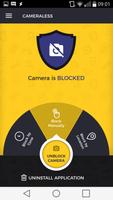
Lock & disable camera to block access against malwares. Perfect camera jammer.
Note: this version may not be compatible with all Android 11 devices. If you have Android 11 device it is recommended to download "Cameraless for Android 11" here: https://play.google.com/store/apps/details?id=com.manyera.camerablocker
Cameraless app is a camera blocker used to disable all cameras in your mobile device, offering full protection against:
◾ Spies, stalkers and various malware
◾ Taking pictures/videos in secure areas.
Primary features
• Option to grant permanent camera access to specific authorized applications
• Camera block as per day
• Password protection
• Multi-language support
• Special mode with maximum security level for classified workplaces
• Auto-camera block as per time/location (PRO)
• One click widget to block/unblock camera (PRO)
• Tasker/Automate integration (PRO)
Product Description
Using your camera remotely without your knowledge; to spy on you, stalk you or harm you is very easy.
Cameraless is the perfect anti-spy camera jammer application.
There are two major functions:
1. Enable / Disable camera manually.
2. Enable / disable camera automatically according to time of day or location.
Cameraless is also useful for those who work at secure environments. One time only – define your workplace location and let Cameraless block your camera automatically when you’re at work. You can also protect your settings with a password so that the app will always function and your device will constantly be protected while you’re at work. Additionally, special notification allows you to verify the status of your device’s camera.
Please note: When the application is password-protected, the level of security is at its maximum.
Don't miss the PRO features with the camera blocker widget and the one-click shortcut to activate the camera even when it is blocked.
Feature List
• 24/7 anti-spy security
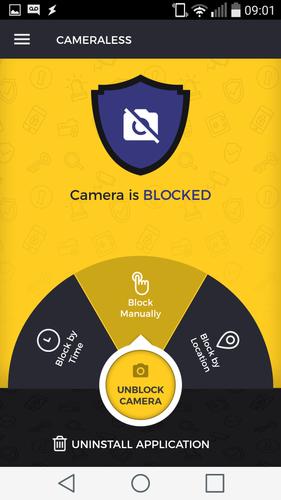
• 3 modes (Manually, lock camera by Time, Block by Location)
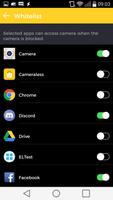
• Whitelist – option to grant permanent camera access to specific authorized applications
• Password protection
• Multi-language support
• Tasker/Llama/Automate plugin
• Extreme battery saving
• Quick uninstall function
• Location mode capabilities: automatic location acquisition, dynamic notifications, auto-sleep when screen is off and auto launch after
• Controlling camera widget
• Quick camera activation shortcut
How to use
• Enable / disable camera manually, by time of day or location from the main screen.
• Whitelist:
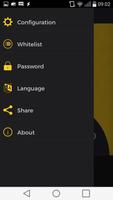
Select “Whitelist” from the menu.
A list will be displayed including all apps installed on your device. Select any app you want to authorize to use the camera even when it is blocked.
Return to the home screen and you’ll see that for every application you have defined, a special Launcher icon has been added which offers camera access to the app at all times, even when blocked.
After closing the app, the camera will automatically be blocked either immediately or as per“Delay time” settings you’ve defined on the Configuration screen.
• Disable by location:
? Insert the center location (lat,lon) of the target area where your phone should be disabled.
? If you are standing in the center of the target area you can click on the "Set current location" button and the center location will be updated accordingly.
? Insert the radius (meters) within which your camera will be disabled (around the center location).
That is all – your phone will become camera-less when you are in the target area and vice-versa.
For support please contact us by email: [email protected]
This app uses Device Administrator permission. This permission level allows Cameraless to block all your device's cameras.








 Download