• Home
  • Games
    Action-adventure Simulation Business Role Playing Sports Competition Casual Intelligence Card Strategy Music Rhythm Text Puzzle Flying Shooting Love Development
  • Apps
    Business Office Newsletter Social Life Entertainment Online Shopping Practical Tools Travel Financial Management Educational Learning Information Reading Sports and Health
  • Articles

English 中文(简体) 中文(繁体) 한국어 日本語 Português Español Русский العربية Indonesia Deutsch Français ภาษาไทย
Home Apps Practical Tools Baturiya mai Hausa
Baturiya mai Hausa

Baturiya mai Hausa

1
2
3
4
5
Download
  • Version 4.0
  • Category Practical Tools
  • Package Name com.benyakubu.baturehausa
  • Update Time August 12, 2026
  • Size 2.16MB
About this app

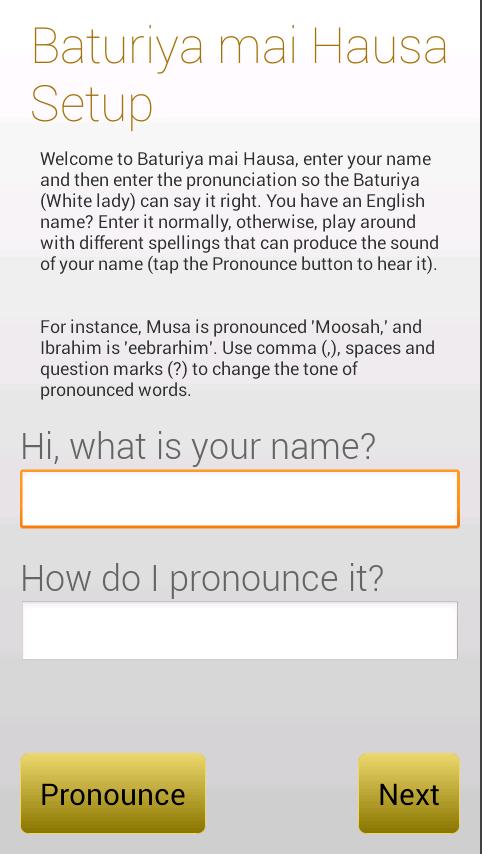
Baturiya mai Hausa is a fun app that portrays a white lady speaking hausa live!

Baturiya mai Hausa is a fun app that portrays a white lady speaking hausa live! Simply enter your name, its pronunciation and:

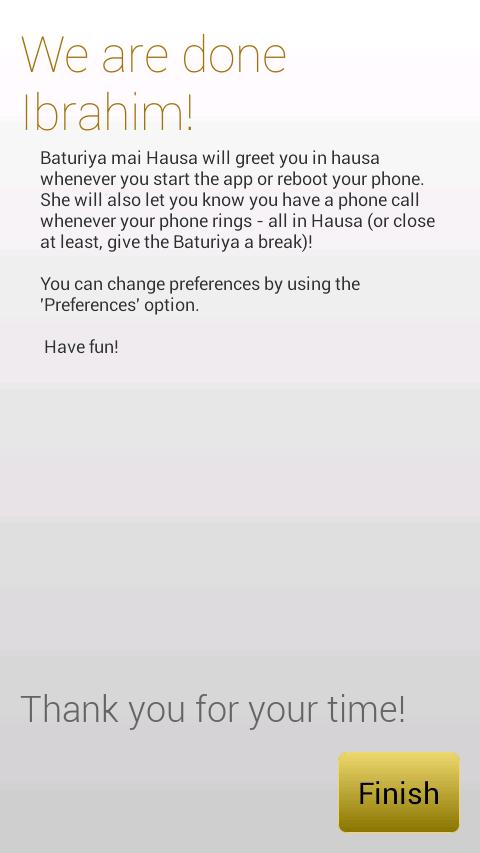
- she will greet you in hausa

- she will announce callers in hausa, if your name is Ibrahim, she will say "Ibrahim, Musa na kira" in a 'turay way.

- she will inform you when your phone is charging or not.

This app does not claim to be fluent in Hausa but our Baturiya comes a bit close in a fun way for a first timer in Hausa. Its mainly for entertainment, nothing more.

It could help some only hausa speaking people in a funny way. Like the aged who cannot read the current caller name - the phone will pronounce the caller name whenever there is a call.

For best results ensure your text-to-speech engine is Pico.

PLEASE DO NOT LEAVE A POOR RATING IF YOU DID NOT SET YOUR TEXT-TO-SPEECH ENGINE PROPERLY. ITS UNFAIR TO BLAME THE APP FOR A DEFICIENCY FROM YOUR DEVICE.

You can setup TEXT-TO-SPEECH using the following steps:

Android 4 upwards

1. Go to Settings

2. Language & input

3. Text-to-speech output

4. Select Pico and make sure it's enabled.

Before Android 4

1. Go to Settings

2. Voice input & output

3. Text-to-speech output

4. Select Pico and make sure it's enabled.

PICO may not be installed, get it like this:

Go to Settings -> Voice Input & Output -> Text-to-Speech settings > Pico TTS (Pico TTS settings) and then click on "Install voice data" and install at the English "Pico TTS"

Keywords:

Nigeria, greet, caller announce, say caller name

What's New in the Latest Version 4.0

Last updated on Feb 10, 2016 Fixed Preferences crash on older devices that don't have SwitchPreference
Fixed another really rare crash when number of times to announce call is not set
Fixed a rare crash on Speak
Download(2.16MB)
Users also viewed
  • SUIHOU -Bubbles- LiveWallpaper

    SUIHOU -Bubbles- LiveWallpaper

    3.4 August 12, 2026
  • Sleep Smarter

    Sleep Smarter

    1.0.00 August 12, 2026
  • Guangzhou Weather

    Guangzhou Weather

    1.1 August 12, 2026
  • FREE Linear Interpolator

    FREE Linear Interpolator

    1.03 August 12, 2026
  • AOKP WALLPAPERS 2

    AOKP WALLPAPERS 2

    4.0.1 August 12, 2026
  • Best Flashlight

    Best Flashlight

    1.3 August 11, 2026
  • Water Surfer Bike Beach Racing

    Water Surfer Bike Beach Racing

    1.01 August 11, 2026
  • Intermed

    Intermed

    1.0 August 11, 2026
  • VEXUS CAM

    VEXUS CAM

    V6.38.02.09 August 11, 2026
  • Opus Compass

    Opus Compass

    1.2 August 11, 2026
  • VPN Over DNS  Tunnel : SlowDNS

    VPN Over DNS Tunnel : SlowDNS

    2.6.7 August 11, 2026
  • Theme Weed Ganja for GO SMS

    Theme Weed Ganja for GO SMS

    3.0 August 11, 2026
  • wetter-profi.at

    wetter-profi.at

    5.421 August 11, 2026
  • Living Room Ideas & Design - F

    Living Room Ideas & Design - F

    2.1 August 11, 2026
  • Emotional Stickers

    Emotional Stickers

    1.6 August 11, 2026
About Privacy Policy Terms of Service Cooking Policy

© Copyright 2017-2026 downzq.com