

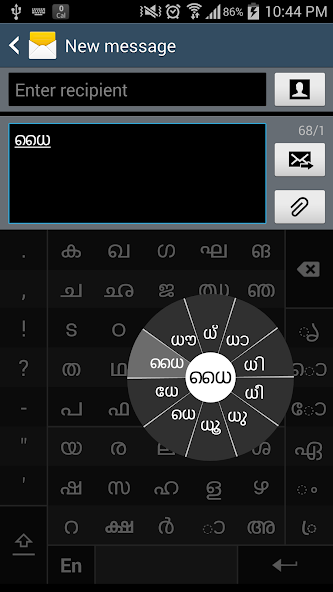
Swarachakra is a logically ordered keyboard, found to be easy to use for newbies
“ഓമനത്തിങ്കള്ക്കിടാവോ നല്ല കോമളത്താമരപ്പൂവോ പൂവില് നിറഞ്ഞ മധുവോ പരി പൂര്ണ്ണേന്ദു തന്റെ നിലാവോ? –ഇരയിമ്മൻ തമ്പി” If your device can display this sentence in Malayalam perfectly, then your device supports Malayalam and Swarachakra should also work well. If you do not see any text, or if some of the words are incorrect, it may not work well.
Swarachakra Malayalam (സ്വരചക്ര മലയാളം) is a touch-screen keyboard for inputting text in Malayalam. (It is available in Telugu, Kannada, Tamil, Hindi, Marathi, Gujarati, Odia, Punjabi, Bengali and Konkani). It uses a logically ordered design based on the structure of Malayalam. It displays the consonants sequenced according to the logical structure of Malayalam, phonetically grouped and arranged in a grid similar to those found in most school textbooks.
How to type
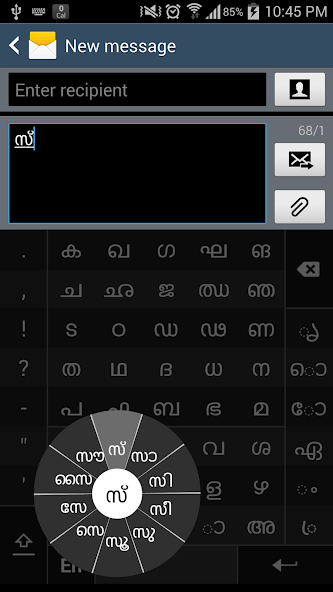
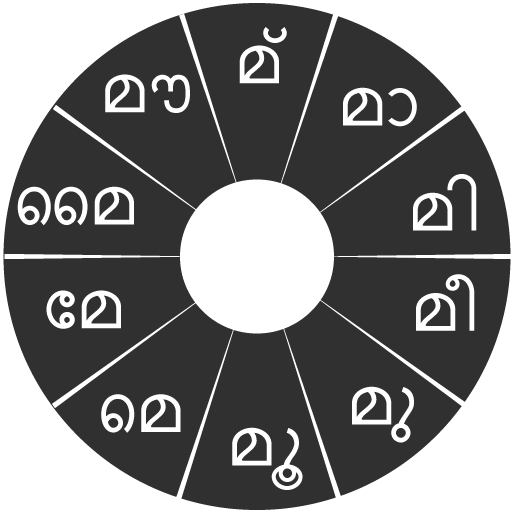
In Malayalam, we frequently need to type a combination of a consonant (ക) and a vowel (േ) like ക + േ = കേ. When you touch a consonant, a chakra with combination of consonants and 10 frequent vowels pops up (കാ, കി, കീ, കു, കൂ, കെ, കേ, കൈ, കൗ, ക്). The chakra gives a preview of the possible character combinations. To select a combination, you slide the stylus or finger towards it.
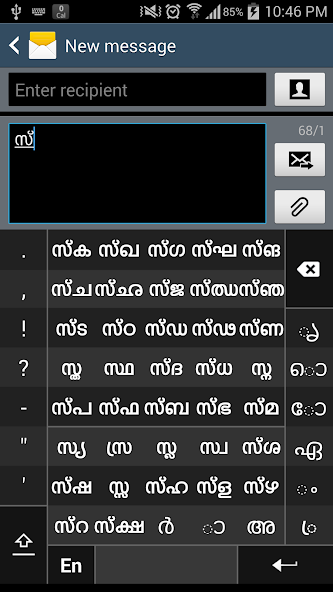
Typing conjuncts like ക്രി, സ്ഥ, ച്യ is particularly hard for most people. Swarachakra makes it easy. First tap on the first part of the combination and select the chandrakala from the chakra (സ + ്). Swarachakra then shows a preview of all possible conjuncts that begin with that consonant (സ + ് + ഥ = സ്ഥ). If you need to add a vowel sign, select it from the new chakra like earlier (സ്ഥാ, സ്ഥി, സ്ഥീ, സ്ഥു, സ്ഥൂ, സ്ഥെ, സ്ഥേ,…).
To type ശ്ര, കൃ, select the corresponding key ്ര, ൃ from the right-most bottom keys, and then type as usual.
To type chillu (ൺ, ൻ, ർ, ൽ, ൾ), select the corresponding key S from the bottom of the keyboard. The less used vowels and modifiers are next to it(ഌ, ൄ, ൌ, ം, ഃ )
Complete vowels (അ, ആ, ഇ, ഈ, ഉ, ഊ, ഋ, എ, ഐ, ഒ, ഔ) appear in a separate chakra on the bottom right. Numerals, symbols and rarely used characters appear on a shift. You could also switch to the QWERTY keypad temporarily to input English characters.
Как установить
First, install Swarachakra Malayalam by clicking the “Install” button above.
Next, you need to “enable” the keyboard. To enable, open “Settings”, select “Language and Input” and check the box in front of സ്വരചക്ര മലയാളം (Swarachakra Malayalam) in the “Keyboard and input methods” section.
Finally, click on the “Default” option in the “Keyboard and input methods” section, and select സ്വരചക്ര മലയാളം (Swarachakra Malayalam) as the default keyboard. (Sorry, but that's how Android works)
NOTE: This app is designed for Android 4.0 (ICS) onwards. It does not work right now on older versions because they do not have Unicode support.









 Скачать