


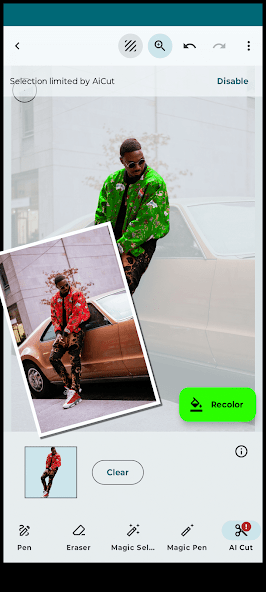

Recolor Photo Editor: Effortless Color Transformation for Your Photos
With Recolor , changing the colors of details in your photos has never been easier. AI 구동 선택, 마법 지팡이 및 수동 펜 도구를 포함한 다양한 고급 도구를 사용하여 사진의 일부를 선택하고 정밀도로 Recolor .
Fine-tune your new colors with brightness and hue sliders or select from a comprehensive color palette. The results are incredibly realistic, preserving shadows, highlights, and reflections for a natural look. For bright elements, use different blend modes to intensify colors while maintaining light integrity. Adjust tonal levels to perfect lighting and shading.
주요 기능 :
AI Object Preselection:
- Let AI automatically highlight prominent elements in your photo for quick edits.
Layer Editor:
- Work on multiple layers to Recolor various parts of your image separately.
Selection Tools:
- Magic Wand: Quickly select areas with similar colors.
- Magic Pen: Similar to the magic wand but with manual control.
- Pen Tool: Manually define details for precise Recolor ing.
- Selection Magnifier: Zoom in for detailed selection adjustments in manual mode.
- Erasers: Use manual or magic erasers to refine your selection.
Recolor ing Tools:
- Replace colors on any element with ease.
- Choose from the RAL color palette for accurate shades.
- Fine-tune colors with hue and brightness sliders.
- Adjust tones for realistic color changes.
- Use various blending modes like "Color," "Multiply," and "Burn" for nuanced transitions.
Project Management:
- Organize and access all your Recolor projects easily in the Projects View.
Additional Features:
- Undo/Redo for all selection and color adjustments.
- Save and share your beautifully Recolor ed photos.
Why Choose Recolor ?
- Experiment with new paint colors before committing to real-life changes.
- Preview home or wall color changes.
- Modify clothing, hair, skin, eye color, or even the sky.
- Add creative color splash effects manually.
- Perfect for designers and creatives wanting to explore fresh ideas with color.
Download Now and Get Creative!
Upgrade to the Pro Version for an ad-free experience.









 다운로드
다운로드