




Manage multiple accounts, Batch Download, Save,Like Photos & Videos on Instagram
More than 10 million users love and download EasyView on Apple app store!
The best and ultimate third-party Instagram app on Apple App Store now comes to Google Play! It is the android version of EasyView.
★★★★★★★★min
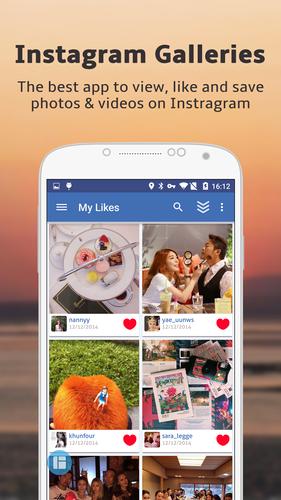
EasyView is a fast, versatile and easy-to-use Instagram App. With EasyView, you can view feeds in multiple columns, and gallery mode is enabled when viewing in full size. It allows you manage multiple Instagram accounts, and browse photos by category (eg Nature, Pets, Food, Cars). You can also make a collection of Instagram photos into amazing collage. EasyView is a wonderful photo makeover, cool and easy to use, beautify and share gorgeous photos to your Instagram.You can even subscribe to interesting tags and users, so never miss an important update! Last but not the least, you could protect your Instagram privacy with the passcode lock.
▶ Explore interesting photos
• Browse popular photos / videos, and the photos / videos you followed or liked
• Browse photos / videos in categories, including Nature, Pets, Girls, Kids, Food, Fashion, Car and Architecture
• Play videos in feed, both preview mode and full size mode are supported
• Check where a photo / video was taken on Map
• Check a user's photos on Map, just like the Instagram's Photo Map feature
• Search by tag or user name
• View photos in full size. Swiping Mode is enabled when viewing photos in full size, allowing users to easily swipe from one photo to another
▶ Easily download photos and videos
• 1-tap to download your favorite photo if you get permissions of its owner.
▶ Batch download photos and videos
• Save at most 100 favorite photos and videos from Instagram at the same time at the background, without disturbing your surfing on EasyView.
• Manage the downloading progress at the well designed dashboard of Batch Download.
• Manage (such as view, share and delete) your downloaded photos and videos just like the official photo album.
(Free version has a limitation of 1 photo or video downloaded at the same time)
▶ Support for multiple users
• Just switch to a different user easily, without having to enter a password again. (This is a premium feature)
*Note: EasyView do not support posting photos to different users because of the strict limitation made by official Instagram.
▶ Collage from Instagram photos
• Collage photos with Instagram photos or photos from your photo library
• Choose any picture from your photo library and make it fit completely on Instagram without having to crop it
• Edit, beautify, decorate photos before posting them to Instagram, and also support a large collection of beautiful and practical picture effects
• 3 collaging modes: template collage, free collage and joint collage
▶ Protect your Instagram privacy
• Easily set passcode lock. This is a premium feature.
▶ Stay closely with important events / friends
• Hide a user's all photos to keep your feed less noisy. (This is a premium feature)
• Subscribe to a tag you are interested in.
• Subscribe to a user, so as not to lose updates of your closest friends or favorite artists.
▶ Vivid liking and commenting
• 1-tap or 2-tap to like photos.
• Type any user's name in comments can immediately @ the user and start replying.
• Tap on any comment to copy or delete it.
▶ Extensive sharing options
• Share photos to Facebook, Twitter, Pinterest, Pocket, Evernote, Tumblr and Sina Weibo .
• Send photos via Email or save to Camera Roll.
You can remove ads and get all premium features by upgrading to Premium version
Unfortunately the Instagram API doesn't support photo upload. However, we have a quick link to launch the official Instagram Android app to take or upload photos.
Download and enjoy EasyView on your phones and tablets!
NOTE:
• You need an Instagram account to use this app!
• This product uses the Instagram API but is not endorsed or certified by Instagram.
Update now, rate it 5 stars if you like the new features~




 Télécharger